
· Shopify chargeback · chargeback dispute · friendly fraud · chargeback prevention · Shopify Payments
What Is a Chargeback on Shopify? How It Works
What is a chargeback on Shopify? Learn what triggers disputes, what they cost your store, how the evidence process works, and how to lower your risk.
A chargeback on Shopify is a reversal initiated by the customer's card-issuing bank, not by Shopify or the merchant. The bank withdraws the disputed amount plus a fee, and the card network, not Shopify, decides who wins.
You opened admin this morning and the payout looked short. An order from last month sits under a dispute notice, tracking already shows delivered, and nobody on your team talked to the buyer first. A refund is a choice you make with the customer. This process starts at the bank, often weeks after checkout, and it runs on a clock you don't set.
If you sell card-not-present on a US DTC store, you'll see this more than a retail counter ever does. The useful question isn't only how to answer the notice. It's whether the order should have been accepted, and whether some disputes never give you a paperwork window at all.
Table of Contents
- What Is a Chargeback on Shopify
- Why Customers File Chargebacks
- What a Chargeback Really Costs Your Store
- How the Shopify Chargeback Process Works
- How to Prevent Chargebacks Before They Start
- Where Securify fits
- Frequently Asked Questions
What Is a Chargeback on Shopify
You're looking at a Shopify Payments balance that dropped overnight, with a chargeback notice on an order you already fulfilled. What is a chargeback on Shopify is simpler than the admin screen makes it look. It's a payment reversal started by the cardholder's issuing bank after that person disputes the charge. This is not a refund you issued, and it isn't a ruling Shopify made.
Three parties split the work. The customer files with the bank. The bank pulls the disputed amount from your account, usually with a chargeback fee, and Shopify tells you to send evidence. Shopify doesn't pick the winner. The customer's bank and the card network read what you upload and decide. Shopify's chargeback process spells out that split: you supply the file, they judge it.
| Aspect | Customer refund | Chargeback |
|---|---|---|
| Who starts it | You, after the buyer asks | The cardholder's bank |
| Who decides | You | The bank and card network |
| Fee | No network dispute fee | Usually a chargeback fee |
| Your evidence | Optional, inside your own policy | Required, on a fixed deadline |
| If you ignore it | The buyer may escalate | The case proceeds without you |
The operational difference is control. A refund is customer service you can time, partial out, or pair with a return label. A chargeback is a bank process with a due date, and it moves whether you answer or not.
A refund is a choice. A chargeback is a deadline.
People file for a short list of reasons, and a plain map of common reasons for chargebacks helps you sort a notice before you start gathering files. Match the claim to the order, then decide if you're looking at fraud, a delivery fight, or a billing mix-up. That label decides which file you build, and whether fighting is even available.
Why Customers File Chargebacks
Five patterns show up again and again. Name the pattern before you write a response, because the wrong label sends the wrong proof.
True fraud: A buyer in Ohio gets a statement charge for a hoodie they never ordered. Someone used a stolen card at your checkout. The cardholder calls the bank, and you already shipped to an address that doesn't match the card.
Friendly fraud: The same customer who emailed "love it" files a dispute two weeks later and keeps the item. The purchase was real. The claim says it wasn't. You're arguing against your own buyer, not a stranger.
Unrecognized charges: The statement shows a processor name or a parent brand, not the store name on your homepage. The buyer doesn't remember you, so they dispute instead of searching their inbox. A descriptor that doesn't match the site is how a happy customer becomes a case.
Fulfillment problems: The carton never scans as delivered, or it arrives and looks nothing like the photos. Item-not-received and not-as-described claims are service failures that became bank cases because the buyer gave up on your help desk.
Process disputes: A subscription kept billing after cancel. A second charge posted for one checkout. A refund the buyer swears never landed. These are bookkeeping fights, and the receipt usually settles them if you still have it.
Online checkout is card-not-present. There's no chip, no signature pad, and no clerk looking at an ID. That structure is why DTC stores feel fraud disputes more than a shop that takes the card in hand.
If you can't name which of the five you're in, you'll send the wrong proof.
Every tactic later maps to one of these causes. A clear descriptor and visible policies cut unrecognized charges and process fights. Screening and traffic controls cut true fraud. Fast support cuts fulfillment fights before they leave your inbox. Friendly fraud is the awkward middle: you can document it, and you still won't talk every buyer out of a false claim.
What a Chargeback Really Costs Your Store
The sale amount is the smallest part of the story merchants tell themselves.
Research from the Federal Reserve Bank of Kansas City found that, for Visa and Mastercard, merchants averaged 1.6 chargebacks per 10,000 sales transactions, while disputed value averaged 6.5 basis points of sales value. About 50% of chargebacks were tied to fraud. About 70–80% were resolved as merchant liability. The merchant fraud-loss rate averaged 0.7 basis points by count and 2.6 basis points by value. Card-not-present sales carried substantially higher total and fraud chargeback rates than card-present sales. A related cut of that work put the average fraud chargeback near $200, against an average sales transaction of $56.
Fraud hits the expensive orders. A thin count still moves real money, and you can lose the goods and the payment on the same order.
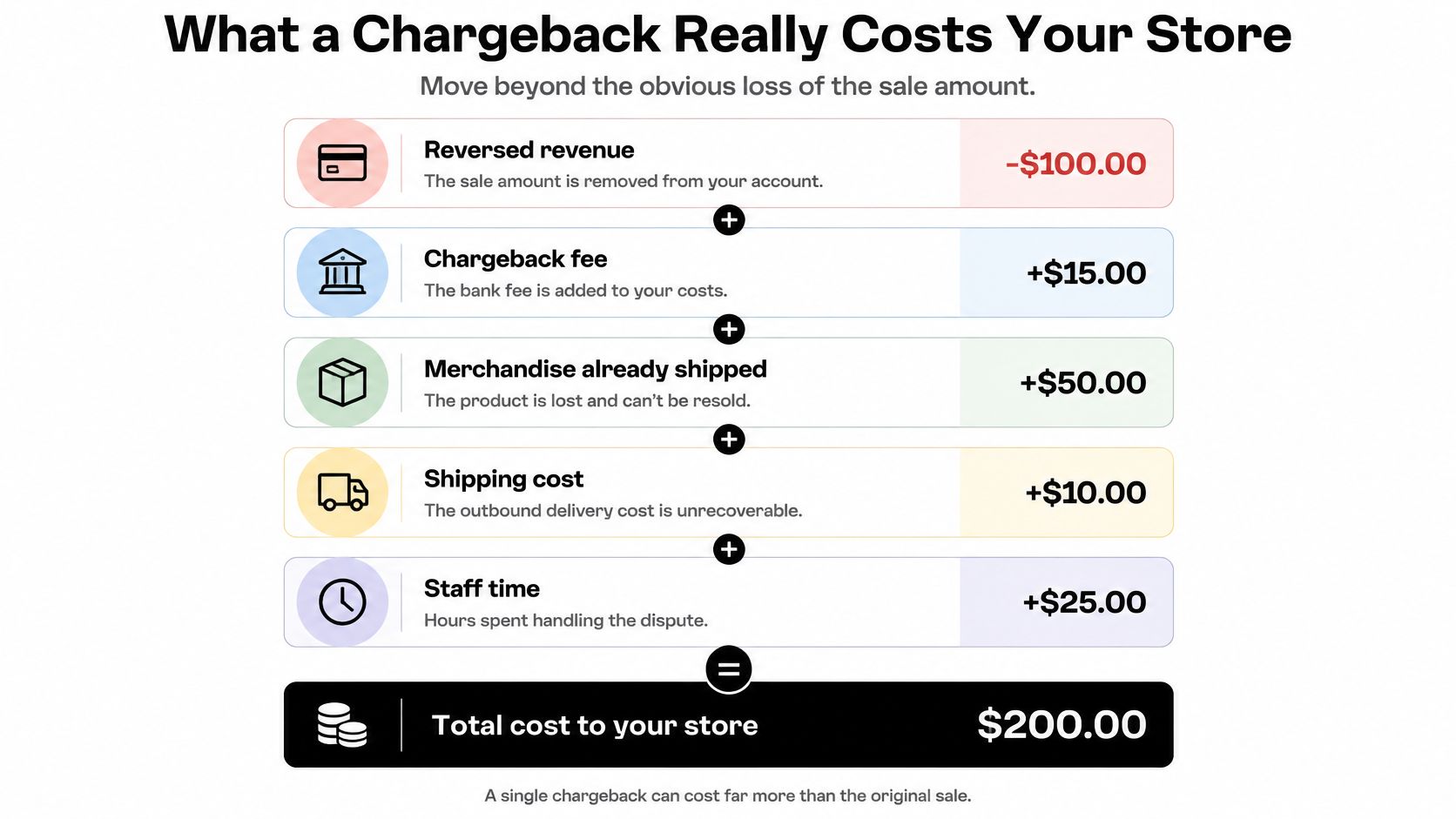
The stack under that sale looks like this.
- Reversed revenue: The bank already took the order total off your balance.
- Chargeback fee: A separate fee usually rides with the reversal. You don't get either back unless you win.
- Merchandise already shipped: The hoodie, the serum, the limited drop is gone. Winning the dispute doesn't put it back in the bin.
- Shipping cost: Outbound postage is spent. A return, if you ever see one, is a second bill.
- Staff time: Someone stops packing orders to pull tracking, emails, and checkout logs. That hour doesn't show up on the dispute screen.
Card networks and Shopify watch how often disputes open. Keep that rate as low as you can. A small count of high-value fraud cases is why teams that care about what disputes do to a Shopify store treat prevention as the cheaper path. The order you never should have shipped is the one that doesn't land in this stack.
How the Shopify Chargeback Process Works
The path is the same almost every time. The cardholder contacts the bank. The bank pulls the funds. Shopify flags the order and shows a due date in admin.
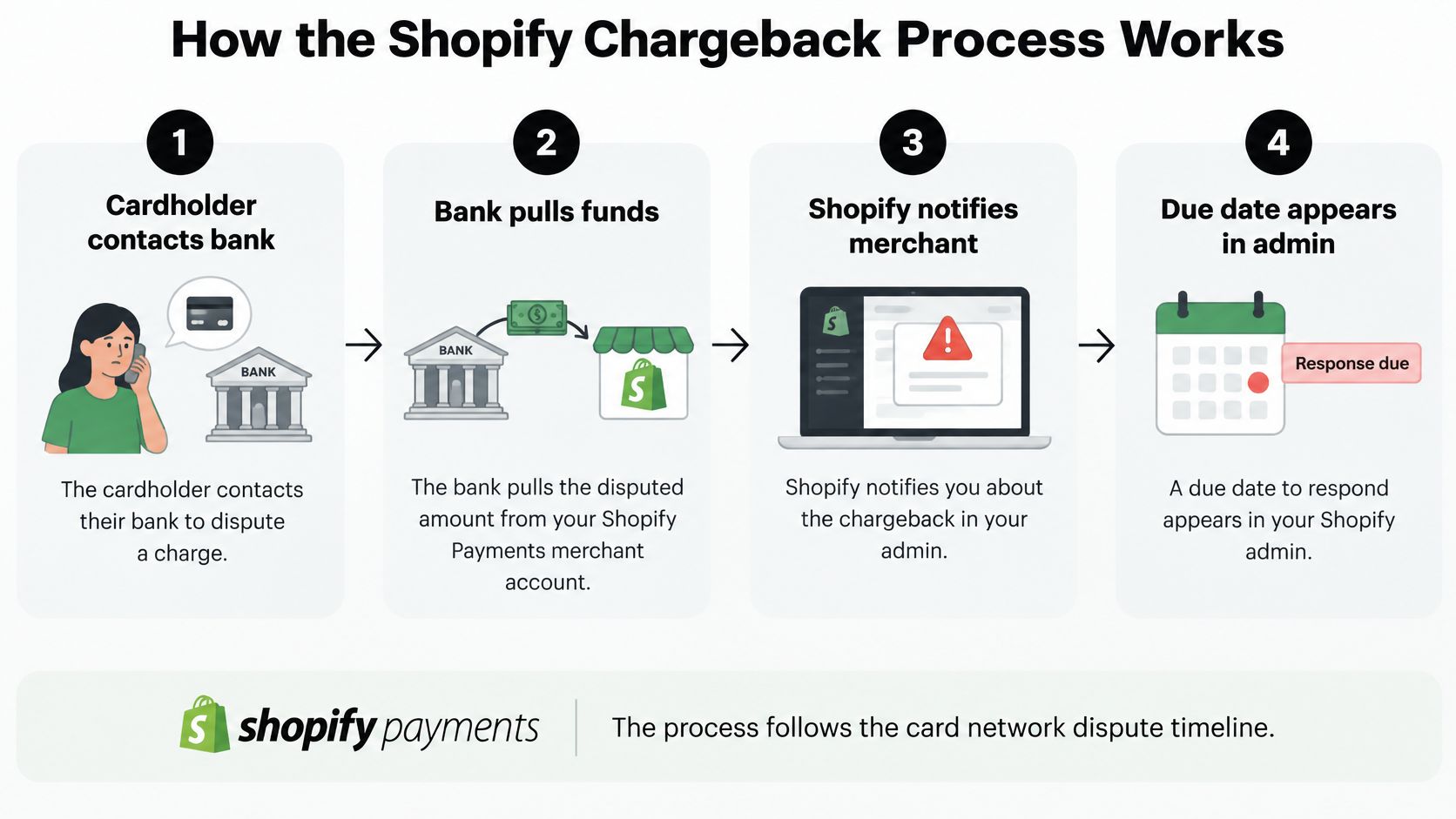
For Shopify Payments, that date is typically 7–21 days after the chargeback or inquiry is filed. You can add or edit evidence until then. After it passes, Shopify doesn't take more files, and there are no exceptions. If no clock time is shown, the cutoff is 11:59 p.m. in the store's time zone on the due date. How to resolve a chargeback is the page that states that hard stop.
Build the packet around what the claim says.
- Order details: What was bought, the price, and the timestamp.
- Delivery confirmation: Carrier scans, and a signature when you have one.
- Customer communications: The email that said the size was right, or the chat that confirmed the address.
- Checkout information: Address and security-code results, plus the device notes already stored on the order.
- Transaction records: The authorization, and any refund you already issued on that same charge.
Then the card company reviews the packet. That review can take up to 75 days. Win, and the amount and the fee come back. Lose, and the sale and the related costs stay gone.
If you also run cards outside Shopify Payments, the bank clock still rules the case. A clear walkthrough of how a processor records a dispute next to the original charge, such as the AgentStack guide to Stripe actions, is useful when the notice isn't the only place the reversal shows up. Pull the record the day the notice lands, not the week the deadline expires.
When the Dispute Never Reaches You
Some merchants assume every notice can be fought. That isn't true if the store is in a network dispute resolution program. Those disputes are resolved automatically before they become formal chargebacks. The customer is reimbursed, you're charged a fee, and you can't submit evidence. Enrollment depends on your payment setup, region, and card network. Watch the dispute status in admin instead of assuming a clean delivery photo will be read.
Shopify Protect is a different lane. It can pay back the disputed amount and the fee on eligible protected orders for fraudulent or unrecognized chargebacks. It's conditional. Read the limits in what Shopify Protect actually covers before you treat a protected badge as a blanket.
If the program auto-resolves the case, your best delivery record never gets a hearing.
The practical shift is upstream. Spot risky sessions and bad orders early enough to accept, review, hold, or refuse them before an automated path turns the event into a loss you can't contest.
How to Prevent Chargebacks Before They Start
Work from the storefront inward, then out to the traffic that never should have reached checkout.
Billing descriptor: Make the name on the card statement match the name on the site. Unrecognized charges start when those two strings disagree.
Policies and support: Put shipping times and the return window where a buyer can find them before they pay. Answer the "where's my order" email the same day. Most fulfillment disputes are a buyer who couldn't reach you.
Tracking on every shipment: Send the number, and keep the delivery record. Teams that ship physical goods can borrow the habit in this note on proof of delivery for building suppliers: the scan that proves arrival is the file you'll wish you had.
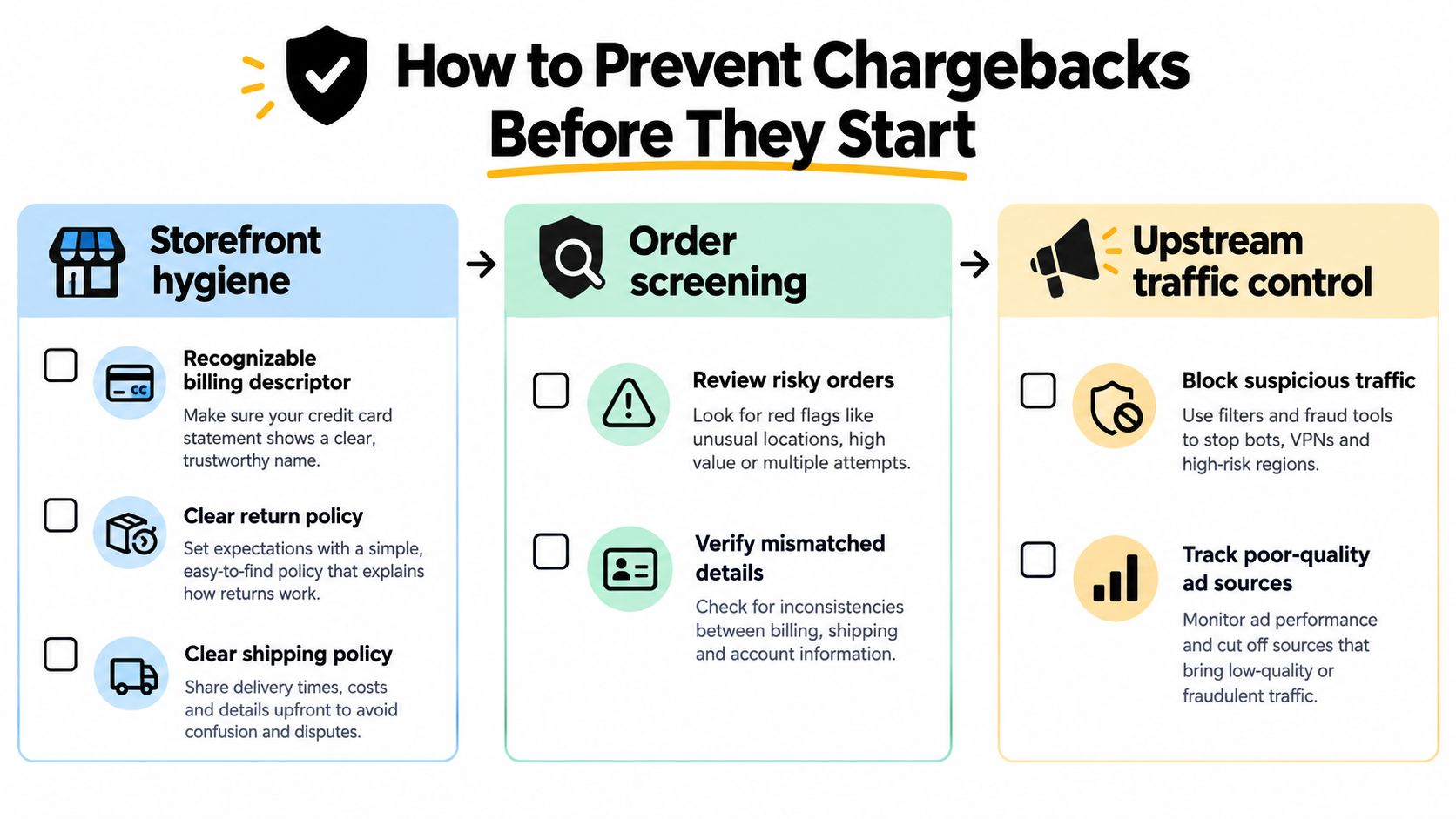
Don't fulfill an order Shopify already marked risky until a person has looked. Compare billing and shipping. A mismatch plus rush shipping is a common fraud shape, not a personality quirk. The walkthrough on Shopify fraud analysis and the notes on high-risk orders cover what to check before the label prints. If you can't verify the buyer, cancel. Shipping and hoping is how you donate inventory.
Repeat abusers come back. How to block a customer on Shopify is the blunt tool for a known email, address, or pattern you've already lost money on.
Bots, VPN-masked sessions, and visits from countries you don't ship to raise both fraud pressure and junk in your analytics. That noise makes real orders harder to see. Chargeback fraud prevention and the guide on chargeback costs and early traffic control sit on this layer: decide at the session, not at the dispute form.
The cheapest chargeback is the order you never accepted. Each layer above cuts how often the bank process even starts.
Where Securify fits
Disputes are a late symptom. The session that became the order was the earlier decision.
Securify sits in front of that decision. It filters non-genuine traffic, including bots, VPN and proxy sessions, and visitors from regions you don't serve, before those sessions turn into risky orders. The controls are geo-blocking rules, bot blocking, and traffic classification. It acts before and alongside Shopify's own order checks. It doesn't replace them, and it doesn't file disputes or promise a chargeback won't happen.
A no-signup Store X-Ray scan reads recent traffic quality in about 30 seconds. Cleaner sessions also mean the conversion rate you report is closer to real buyers. You can install it from Securify on the Shopify App Store.
Frequently Asked Questions
Does a chargeback still count against my store if I win?
Yes. Shopify calculates the chargeback rate from all disputes opened, not only the ones you lose. A successful defense doesn't pull that dispute out of the rate. Card networks and Shopify monitor the figure, and you should keep it as low as possible. The practical goal is fewer filings, not a prettier win record after the bank has already opened a case.
Can a customer dispute a Shopify order months after delivery?
They can dispute well after the box arrives. The Consumer Financial Protection Bureau says the cardholder should send a written billing-error notice within 60 calendar days after the charge appears on the statement. The card company then generally has 30 days to acknowledge it, unless it finishes the required steps inside that window. That's why a buyer can wait weeks, and you still get a short response date in admin.
Should I just refund the customer to stop a chargeback?
Not after the bank has opened it. A refund at that point doesn't cancel the dispute, and you can end up discussing both the refund and the reversal. Answer with evidence while the window is open. The refund that helps is the one you issue while the complaint is still in your inbox, before anyone calls their bank.
Does Shopify Protect cover every chargeback?
No. It applies to eligible protected orders and to qualifying fraudulent or unrecognized disputes. Ordinary service fights, duplicate-charge arguments, and orders that were never protected stay on you. Treat the badge as a narrow reimbursement path, then keep screening orders so fewer of them depend on it.
Securify filters bots, VPN and proxy sessions, and traffic from places you don't ship, so fewer bad sessions become orders you later have to defend. That's the upstream side of a Shopify chargeback, before a bank pulls the money and a deadline starts. See how your recent traffic looks at Securify.