
BIN Attack: How to Spot One on Your Shopify Store and Shut It Down
A BIN attack runs guessed card numbers through your checkout. Learn how to spot one on Shopify and which settings stop it.
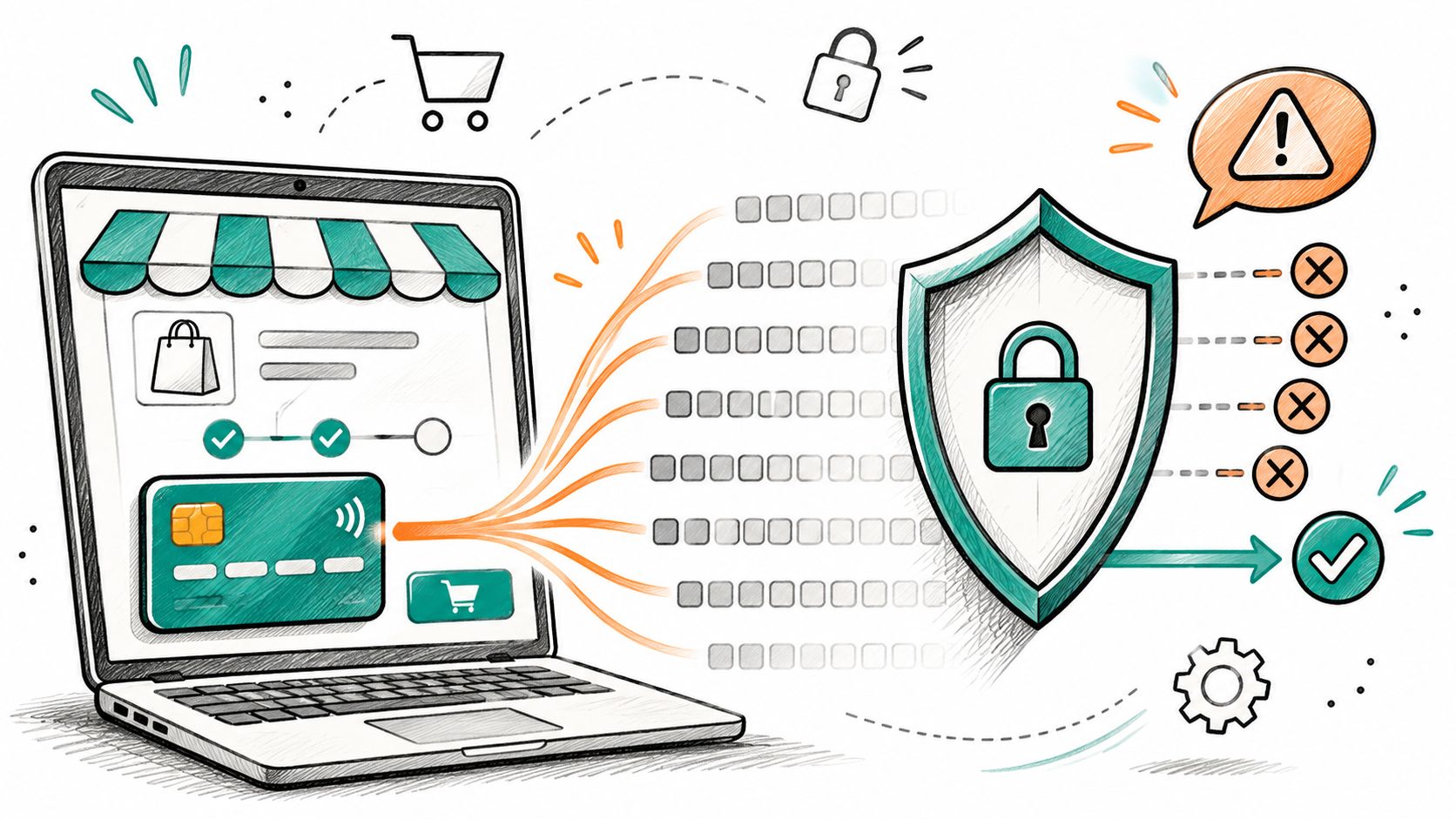
A BIN attack is an automated card-not-present attack where fraudsters start with a card's Bank Identification Number, the first six to eight digits that identify the issuing bank, and guess the remaining account digits, expiry date, and security code through online checkouts until some attempts are approved.
You usually find out the hard way. You open your Shopify admin on a Tuesday morning and spot dozens of declined payment attempts that hit at 3 a.m., or an email from your payment processor flags suspicious enumeration on your account. No inventory left the warehouse, yet your checkout logs look like a battleground.
Table of Contents
- What Is a BIN Attack and How Guessing Works
- BIN Attack vs Card Testing
- Signs of a BIN Attack on Your Shopify Store
- Why a BIN Attack Hurts Even When Nothing Sells
- How to Stop a BIN Attack on Shopify
- Where Securify fits
- BIN Attack Questions Merchants Ask
What Is a BIN Attack and How Guessing Works
Unlike stolen-card fraud, a BIN attack is brute-force guessing. Think of a street where every house uses the same lock manufacturer. An intruder already knows the first portion of the key pattern and tests thousands of cuts on the remaining teeth until one door clicks open.
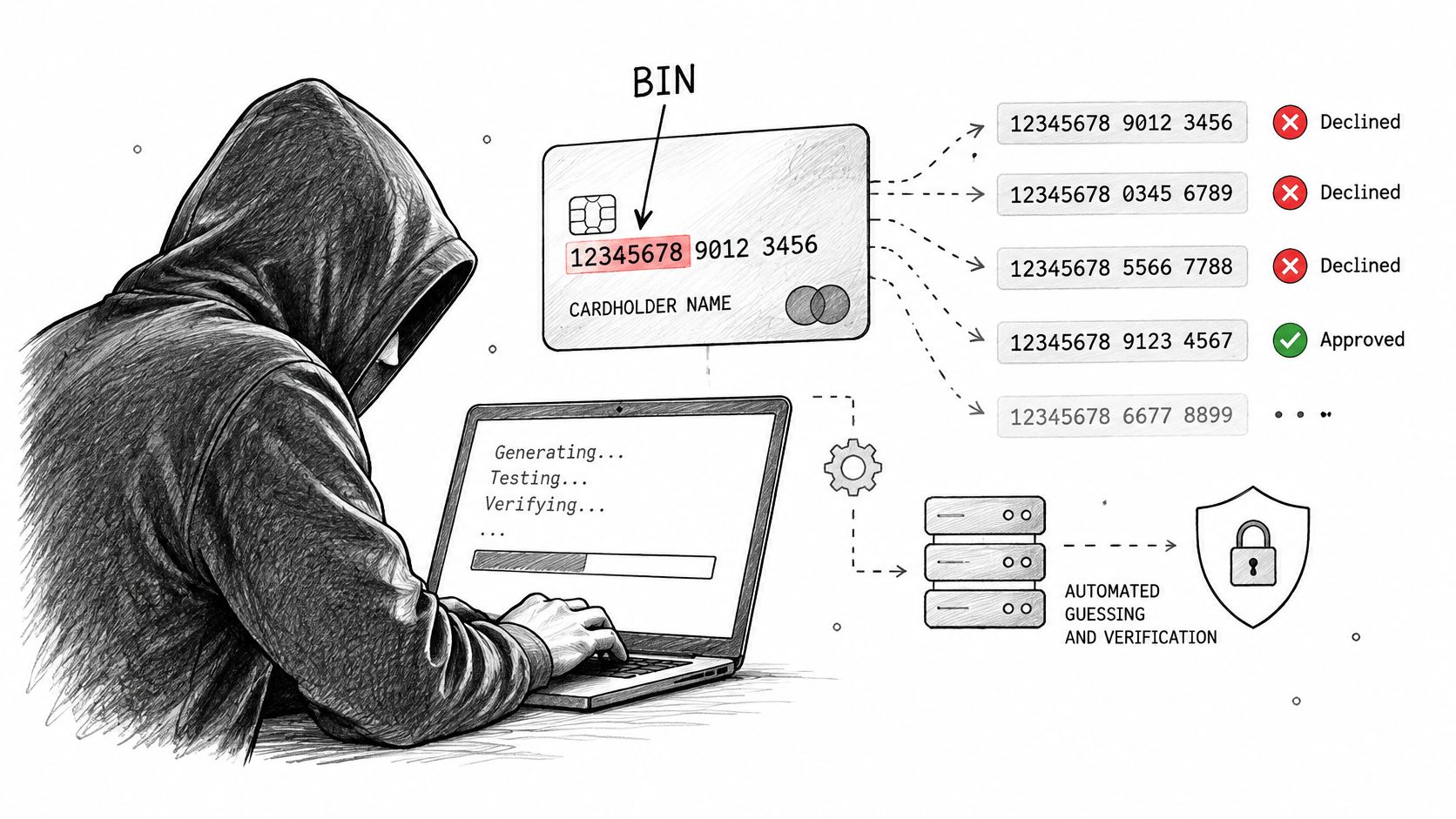
In a BIN attack, automated scripts follow four straightforward steps:
- Grab a known prefix: Attackers pick a valid six-to-eight-digit BIN tied to a specific issuing bank and card product.
- Generate candidate numbers: Software produces sequences for the remaining card digits that pass basic format validation before ever touching a checkout.
- Guess the missing credentials: Scripts cycle through expiration dates and security codes across rapid, low-value or zero-value checkout attempts.
- Read the checkout response: Your payment gateway's approval or specific decline codes act as an answer machine, telling the attacker which generated combinations belong to live accounts.
Your store isn't the target here. Your checkout is just the testing tool, and valid card details get spent quickly or sold to other criminals.
Why small Shopify stores get hit
Attack groups deliberately hunt for low-friction e-commerce checkouts rather than giant retail chains. An ABC News report on BIN attacks documented one Australian small-business site that absorbed almost 17,000 fraudulent transaction attempts between April and May 2023, more volume than the store normally saw in five years. The same report cited Australian Payments Network figures showing A$577 million in payment-card transaction fraud during 2022, a 16.5% increase from 2021.
The problem has scaled internationally as scripts replaced manual testing. According to Mastercard's Fraud Watch briefing cited in an INETCO BIN attack analysis, global BIN attack incidents have risen 80% since 2020. Because bots spread attempts across hundreds of storefronts at once, any individual burst can look small until you inspect the decline logs.
Key mechanic: In Visa's guidance on enumeration attacks, authorization responses themselves act as a validity oracle, where subtle differences in approvals, decline codes, and verification results tell scripts which cards are active.
BIN Attack vs Card Testing
Shopify groups both patterns under the same umbrella term, "card testing" (also referred to as carding, account testing, and card enumeration), and Shopify Payments' built-in card testing protection targets both behaviors. Still, knowing which pattern is hitting your store changes which dial you turn first.
The core split is simple. A BIN attack starts from a six-to-eight-digit prefix and guesses the rest of the card details, while card testing starts with full stolen card credentials and checks whether those accounts are still open.
| Point | BIN attack | Card testing |
|---|---|---|
| Attacker starts with | First 6 to 8 digits of a card | Full stolen card details |
| What gets guessed | Card number, expiry, CVV and billing ZIP | Nothing; only whether the card is still live |
| What you see | Many attempts, mostly declines, often on one card brand or bank | Fewer attempts, more approvals, tiny orders |
| Setting that hurts it most | CVV and AVS declines at payment | Traffic filters and checkout blocks |
| Shopify's term | Card testing or card enumeration | Card testing |
That third and fourth row matter most when you're triaging an active spike. Because a BIN attacker doesn't know the cardholder's real security code or billing postal code, strict CVV and AVS decline rules cause nearly every guess to fail immediately. When attackers already hold full stolen card details, CVV and AVS often pass, so traffic filtering and checkout blocks carry the heavier load.
If your logs show tiny completed orders alongside stolen credentials rather than a wall of invalid-CVV failures, read our full breakdown of card testing to see the specific patterns there. And if your checkout logs show both patterns at once, don't pick sides. Turn on the payment verification rules and the traffic filters together.
Signs of a BIN Attack on Your Shopify Store
Most BIN attacks leave a noisy trail in your payment logs long before a real cardholder disputes a charge. According to Tieto's 2026 Payment Fraud Report, just under 10% of card authorization cases in 2025 were related to BIN attacks, and 76% of cases ended with zero financial loss, reflecting test activity and real-time controls.
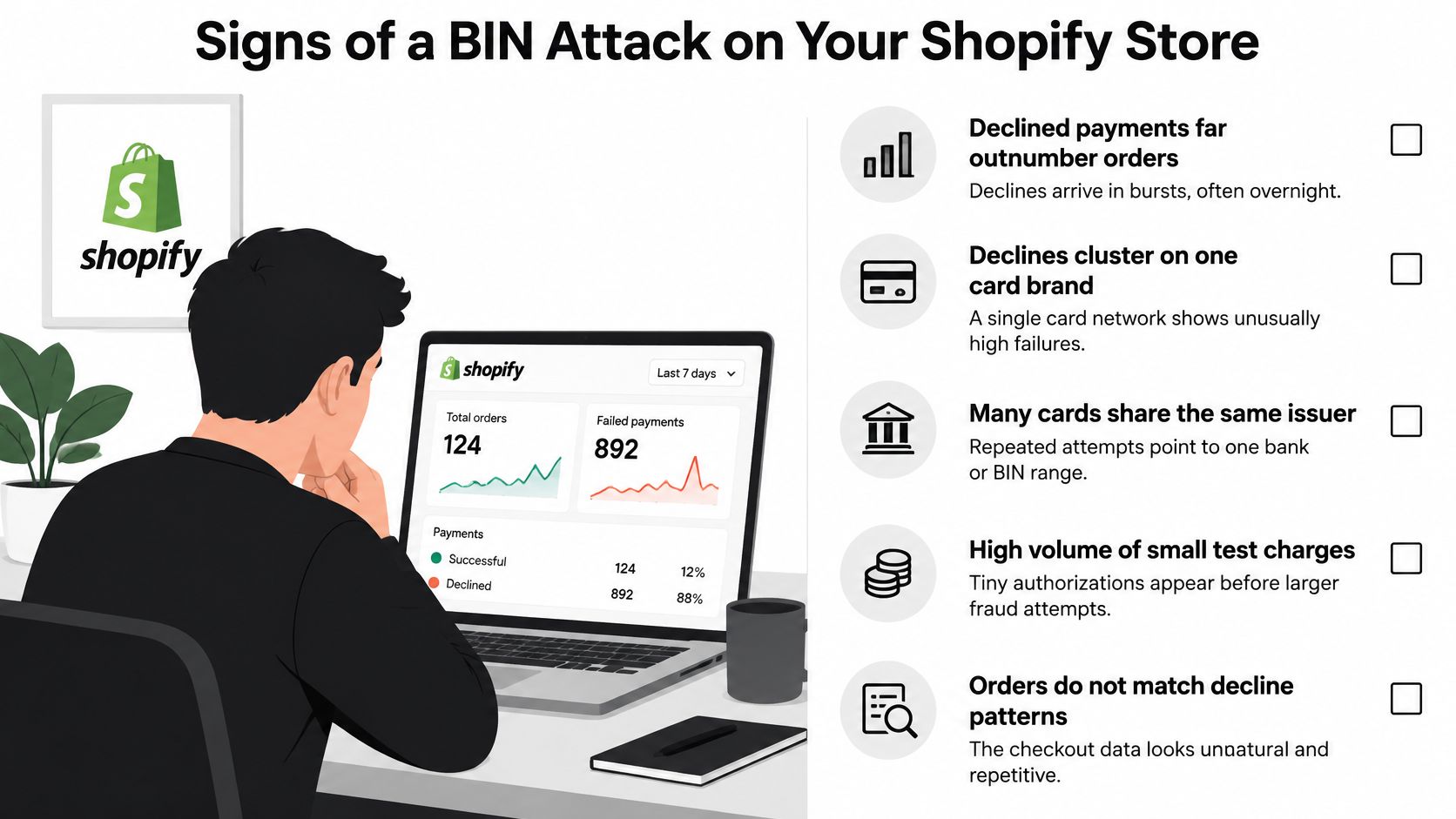
Run through this checklist against your Shopify admin and your payment provider's dashboard when activity feels off:
- Declines dwarf actual orders: Failed payment attempts arrive in tight bursts, frequently overnight or outside your normal US shopping hours, while completed sales stay flat.
- Single-brand or single-bank clustering: Declines pile up on one card network or one issuing bank. Open your payment provider's transaction view to spot issuer concentration.
- Guessing-style decline codes: Instead of "insufficient funds", you see repeated failures for incorrect CVV, invalid card number, or expired card.
- Multi-card fraud indicators: On orders that do slip through, check for Shopify's warning that "the customer tried to use more than one credit card." Understanding how Shopify Fraud Analysis rates an order helps you separate a shopper mistyping a card from a script cycling through numbers.
- Tiny or zero-value attempts: Scripts commonly target your cheapest SKU, a gift card, or a zero-value authorization to avoid triggering issuer spend alerts.
- Blocked checkout entries: Look inside your abandoned checkout views for blocked sessions or notes indicating an IP was placed on a temporary blocklist.
- Non-residential IPs in order risk details: Inspect the IP behind suspicious attempts. Datacenter hosting ranges, proxies, and VPN exits show up constantly in automated runs, and running an IP reputation check confirms whether the visitor came from a server rather than a home connection.
One catch catches many store owners off guard. Shopify automatically leaves suspected card-testing checkouts out of your Abandoned checkouts list, so the numbers you see inside Shopify admin often understate the volume hitting your processor.
One odd decline at midnight is normal retail noise. Two or three of these signals clustering inside the same twenty-minute window is a pattern you should act on right away.
Why a BIN Attack Hurts Even When Nothing Sells
A BIN attack costs your store money and operational stability even if zero fraudulent orders ship out. Waiting until a disputed package shows up means absorbing silent damage first.
Start with direct gateway friction and analytics pollution. Every submitted authorization consumes processing capacity, and third-party gateways frequently charge per-attempt transaction fees that apply to declines too. Meanwhile, hundreds of automated checkout sessions wreck your conversion rate metrics and muddy retargeting audiences.
Second, a decline spike can drag down legitimate sales long after the bots move on. Shopify warns that a surge of failed payments can increase your decline rate for legitimate customers, even after an attack stops. That risk isn't theoretical. As detailed in Brandefense's BIN attack analysis, Visa's Acquirer Monitoring Program rules effective June 1, 2025 count both approved and declined attempts toward monitoring thresholds, including an enumeration ratio of 20% of authorizations and 300,000 enumerated transactions.
Third, any guess that gets lucky turns into a real order, and eventually a dispute. Reviewing what a chargeback is on Shopify makes the downstream hit clear: approved fraudulent orders can trigger chargebacks, dispute fees, and payout holds, while third-party transaction fees aren't refunded when you cancel. Card networks and Shopify monitor your chargeback rate closely, so you need to keep it as low as possible. Controlling abusive traffic early also protects your margins, a link we unpack in our guide on early traffic control and chargeback costs.
Treat the decline spike itself as the incident. Your checkout logs are the proof you need to tighten defenses before a single chargeback arrives.
How to Stop a BIN Attack on Shopify
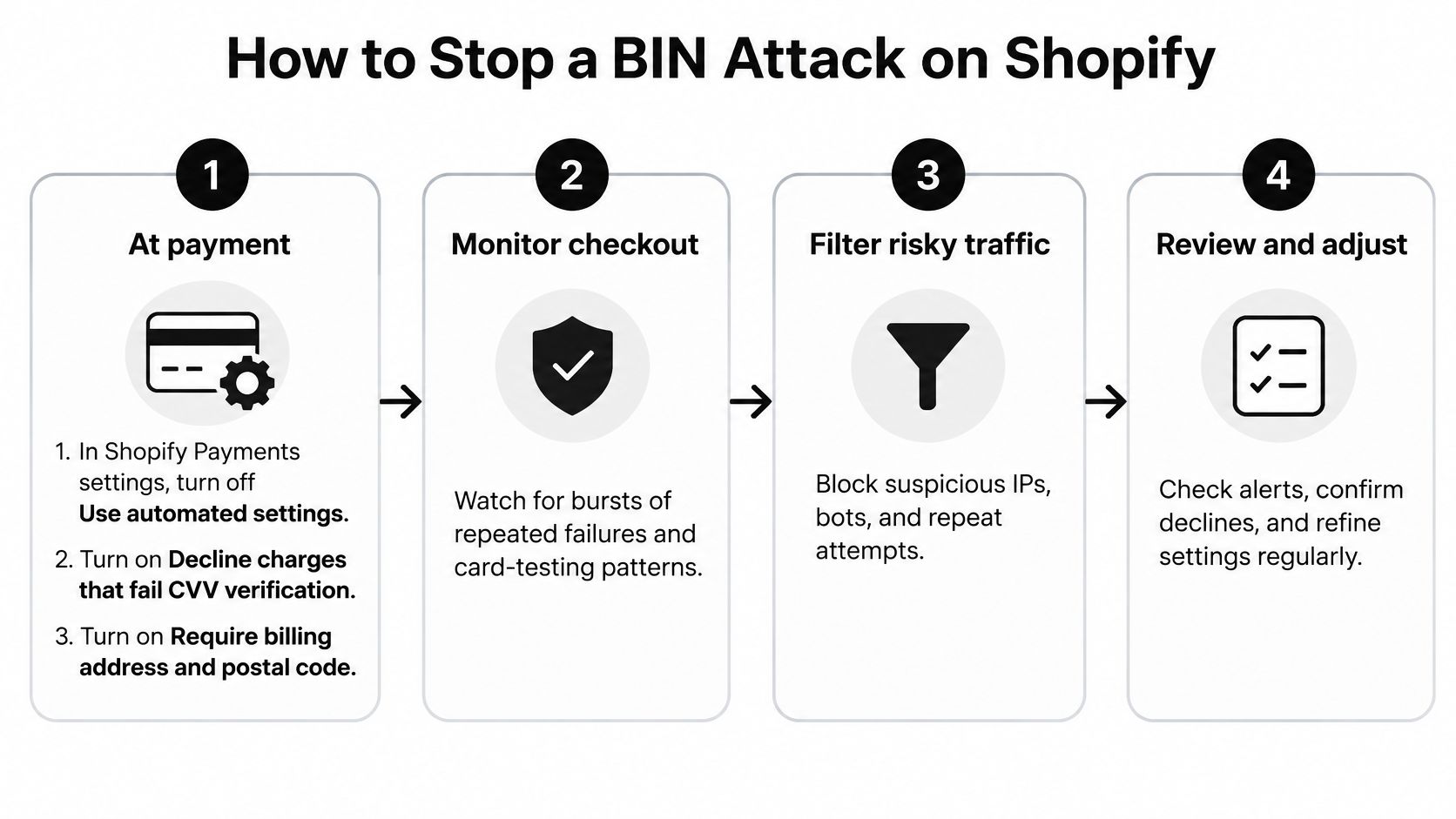
I'd tackle an active BIN attack in strict order: tighten payment verification first to stop guesses from succeeding, layer checkout rules second, filter bot traffic before checkout third, and lock down fulfillment until the storm passes.
At payment
- Disable automated fraud defaults in Shopify Payments. Open your Shopify Payments settings and turn off "Use automated settings" so you can enforce strict card verification checks directly.
- Enable CVV failure declines. Turn on "Decline charges that fail CVV verification." Because BIN attackers don't have the three- or four-digit security code, this single toggle breaks most blind guesses, though keep in mind CVV and AVS settings only make guesses fail rather than stopping attempts from reaching your checkout.
- Enable AVS postal code declines. Turn on "Decline charges that fail AVS postal code verification." Declined attempts don't create an order, and Shopify Payments includes built-in card testing protection, though Shopify warns that strict AVS matching can raise failed transactions for buyers who mistype a ZIP code or travel internationally. Monitor your approval rate for a few days after switching it on. If you run a third-party gateway instead of Shopify Payments, contact its support team and ask what velocity limits or BIN-level rules they can enable on your account.
At checkout
- Deploy Fraud Control checkout rules and velocity limits. Use Shopify's Fraud Control app to build checkout rules that block repeated abuse by email address, shipping address, ZIP code, or IP address; blocked scripts receive a generic checkout error without creating an order. Avoid assuming Fraud Control blocks a card's BIN, because it filters checkout attributes rather than card prefixes. Pair those rules with checkout CAPTCHA and rate limits on IP, device, and email velocity. The PCI Security Standards Council guidance on account testing recommends a layered defense and notes that PCI DSS compliance provides a strong security foundation against this threat.
Before checkout
- Block automated and masked traffic at the storefront. Scripts can't test your checkout if they never reach the payment form. Filtering datacenter IPs, headless bots, VPNs, and proxies upstream cuts authorization noise at the source. Start by reviewing how bot detection separates scripted runs from human browsers, walk through practical steps on how to block bots on Shopify, and map out layered Shopify fraud protection across your storefront. Cleaning up scripted bursts before they hit checkout also keeps your analytics accurate, which pairs well with this guide to attributing Shopify revenue when you're trying to separate real campaign performance from bot distortion.
After an approval slips through
- Freeze fulfillment and switch to manual capture. Never ship an order tied to a suspicious burst. Cancel and void approved orders immediately before capture so funds don't settle, and temporarily switch your payment capture setting from automatic to manual while the attack is active so you can review orders before accepting money.
Order of operations: Flip CVV and AVS declines first to stop lucky guesses, then add checkout rules and upstream traffic filtering so scripts stop burning through your decline ratio.
Where Securify fits
A BIN attack script is guessing, so every card number it tries costs you a decline whether or not it ever becomes an order. The earlier you stop the script, the fewer guesses reach your payment form. That filtering happens at the storefront traffic layer, before checkout or payment fraud tools ever see the visitor.
Securify on the Shopify App Store screens every visitor in real time as they browse. Bots, datacenter traffic, VPNs, proxies, and traffic from high-risk countries get flagged or blocked before they touch checkout, while real shoppers pass straight through. At checkout, it blocks fake and risky emails, so no order is created, and it alerts you to suspicious spikes. Its live visitor log lets you see your VPN and bot traffic by IP, country, browser and referrer. Securify never sees card numbers or BINs and never decides authorizations; Shopify Payments or your gateway does. Geo-blocking handles countries you do not serve without treating location alone as proof of fraud.
It works before or alongside Shopify Fraud Analysis and does not replace checkout or payment fraud tools. Built for Shopify and rated 4.6 from 109 reviews. Securify has a free plan; current plans are on the Shopify App Store listing.
BIN Attack Questions Merchants Ask
What does BIN stand for?
BIN stands for Bank Identification Number. It refers to the first six to eight digits on a payment card, which identify the issuing bank and card product. Since those digits are predictable, attackers start there and automate guesses for everything after them.
How do I tell a BIN attack from a shopper mistyping their card?
Volume and speed separate the two. A shopper who mistypes retries once or twice, often corrects a digit, and their IP and browser stay consistent. A script fires guesses in rapid bursts from one address or a rotating set, cycles through many card numbers, and never pauses to fix anything. One failed order looks like a typo. Hundreds of failures in a short window are a bot.
Why was my store targeted?
Because guessing costs the attacker nothing. A store selling a $1 product with guest checkout and no rate limit on payment attempts is a cheap place to run thousands of card guesses fast. Low prices mean low fraud scrutiny per order, and open guest checkout means no account friction slowing the script down.
What should I tell my payment provider?
Ask two questions. First, whether it applies velocity rules that cap how many attempts one card, IP, or device can make in a set window. Second, whether it can filter or flag traffic by BIN if a specific card prefix keeps appearing in your declines. Bring your decline logs with timestamps, IPs, and card prefixes so the provider sees the pattern instead of a single complaint.
Will the declines affect my standing with the card networks?
A sustained spike in declined authorizations can hurt your approval rates and draw scrutiny from your processor even when no order ever completes. That risk is the reason to treat the guessing itself as the problem, not just the rare approved order.
Can I block a BIN on Shopify?
Shopify's Fraud Control rules filter by email, address and IP, not by card prefix. Ask your payment provider about BIN rules, and turn on CVV and AVS declines in Shopify Payments.
Will a BIN attack cause chargebacks?
Declines don't, but approvals that become orders can. Cancel them before fulfillment.