
How to Reduce RTO in Ecommerce: 9 Checks Before a COD Parcel Leaves
How to reduce RTO in ecommerce with nine checks before a COD parcel leaves: SMS confirmation, pin code checks, COD limits, NDR follow-up and weekly review.
Most return-to-origin losses are locked in before the courier ever scans the parcel. Once a cash-on-delivery order leaves your warehouse, all that's left is the courier's reattempt schedule and a phone number that may not answer. Prevention happens while the order still sits on your desk, and it costs a fraction of reverse freight. What follows is nine pre-dispatch checks ordered by setup cost, from free settings you can flip today to paid apps and courier processes, and each one names the exact failure it removes. For the definitions and the cost math first, read what RTO is and what it costs.
Table of Contents
- The Nine Checks, Cheapest First
- 1. Confirm every COD order by SMS code and hold fulfillment until the buyer confirms
- 2. Call or WhatsApp only the orders that stayed unconfirmed
- 3. Check phone, pin code and address before packing
- 4. Put limits on COD by cart value and first-time buyers
- 5. Ask for partial COD or a prepaid nudge
- 6. Block traffic you cannot serve
- 7. Ship fast and message the delivery date
- 8. Answer every NDR the same day
- 9. Review RTO weekly by cause
- The Checklist at a Glance
- Where Securify and OTP+ fit
- FAQ
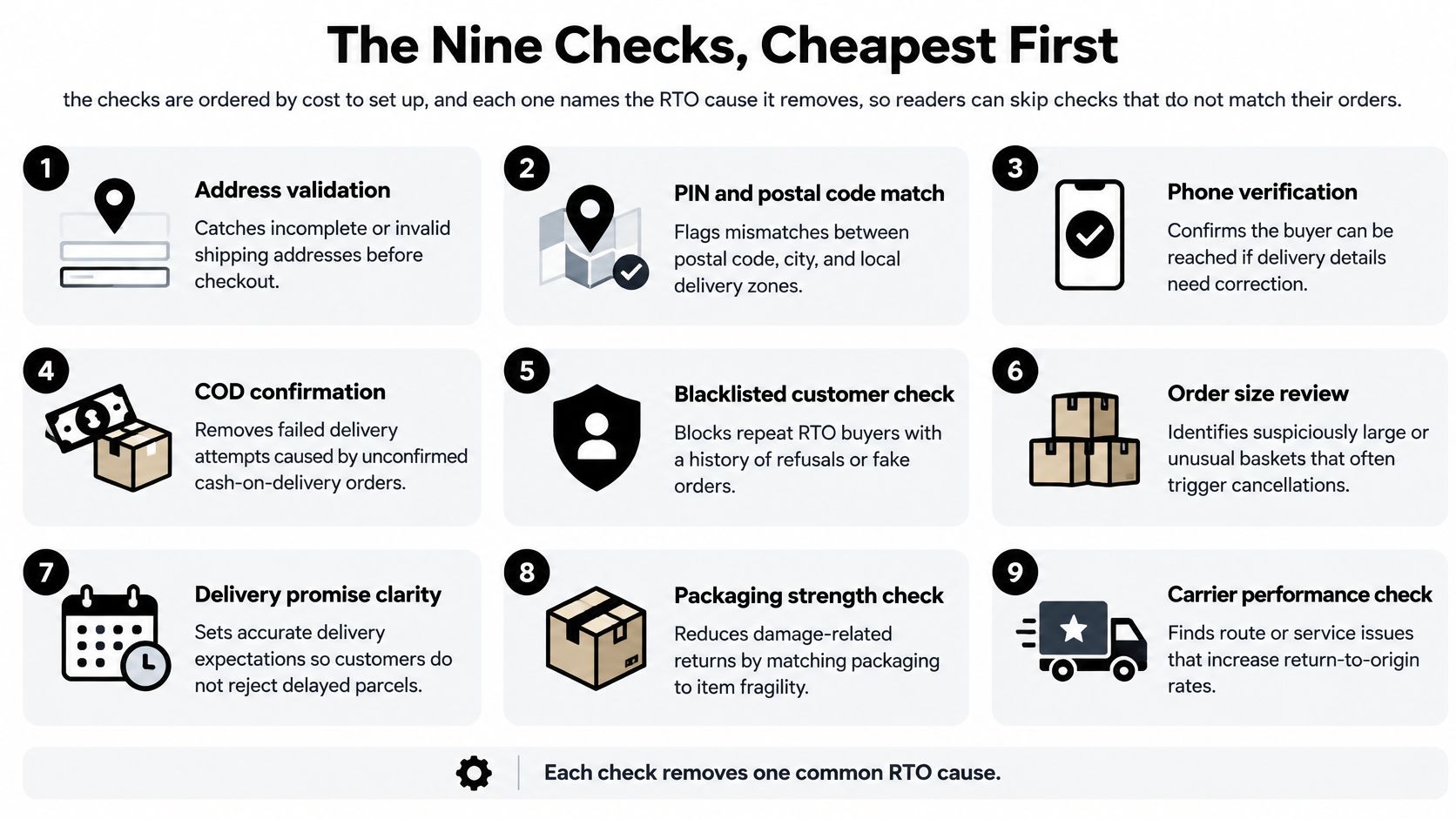
The Nine Checks, Cheapest First
This is how to reduce RTO in ecommerce in practice: fix the cheapest leak first, measure for a week, then move to the next. Each check names the failure it removes, so adopt the ones that match your returns and skip the rest.
The full sequence is below, ordered the way you'd work through it on dispatch day.
1. Confirm every COD order by SMS code and hold fulfillment until the buyer confirms
Start here because it's free and it stops the order before it can cost you freight. The thank-you page asks the buyer for a 6-digit SMS code right after checkout. Set the app to Hold fulfillment (recommended): the order sits unfulfilled until the code comes back, then releases automatically with the tag otp-cod-verified. Orders that never confirm pick up otp-cod-unverified after a window you choose, from 1 to 30 days, default 3.
OTP+ never cancels an order by itself, so install its free Shopify Flow template, Cancel unverified COD orders. It waits, re-checks the tags, then cancels with restock. That one flow removes fake orders and most impulse cancellations before a single shipping label is paid for. Both the app's COD verification and the flow template are free.
2. Call or WhatsApp only the orders that stayed unconfirmed
After a week of check 1, the unconfirmed pile becomes a short worklist instead of a warehouse problem. Filter Orders by the tag otp-cod-unverified and contact only those buyers. Send a two-line message with a delivery date and count what comes back; that recovery rate is the only number that tells you whether the follow-up earns its hour. The buyers who never answer were never going to.
If you'd rather not cancel at all, replace the free template with a Flow that emails you a daily digest of unconfirmed orders and leaves them open. Removes the manual confirmation desk that gets built by accident in month one and abandoned in month two.
Practical rule: never confirm 100% of orders by hand. Confirm the exceptions or you'll hire a person to do what a code does for free.
3. Check phone, pin code and address before packing
Set Settings › Checkout › Shipping address phone number to Required. That single field is the cheapest thing you'll ever add, because every check downstream depends on it. Address autocomplete stays on by default and works in India, but it only completes what the buyer types; it doesn't verify the result.
The verification side is the gap. Shopify's address validation suggestions work from a fixed list of supported countries, and India isn't on it, so Indian addresses get fewer specific suggestions (Shopify Help). Do the next best thing: check the pin code against your courier's serviceable list and flag any address with no house number, no landmark, or a pin code that doesn't match the city. This removes address-incorrect NDRs, which are the ones you can repair.
4. Put limits on COD by cart value and first-time buyers
Hiding COD above a cart value, or for a customer with zero orders, isn't a native setting. It needs a payment customization app on Basic plan or higher; Checkout Blocks does the same job on Plus only. Native Flow can still tag or hold a first-time buyer's COD order if you build the condition on the payment gateway name and the customer's order count. In Flow these are the order's paymentGatewayNames and the customer's numberOfOrders fields (Shopify Admin API).
Removes the biggest-ticket RTOs. A refused high-value parcel eats the same reverse freight as a small one and gives back nothing. For the full COD setup, see cash on delivery on Shopify.
5. Ask for partial COD or a prepaid nudge
Collecting part of the amount online, or discounting prepaid, isn't native. Shopify has no discount condition on payment method, so a prepaid discount code is either automated through an app or handled manually by support. Partial COD depends on your courier collecting a reduced cash amount at the door, so confirm it before you advertise it.
Both work on the same psychology: a buyer who has already paid something shows up for the parcel. Removes refusals on high-value parcels, where the gap between "I'll take it" and "I'll pay for it" is widest.
6. Block traffic you cannot serve
Traffic you can't serve still places orders. Allow only the countries you ship to, and block bots, datacenter, VPN, proxy and Tor traffic, plus risky email addresses at checkout, so the order never exists. That traffic layer is what Securify handles for Shopify stores. Anything that slips through lands in Shopify's fraud analysis, which scores orders low, medium or high risk from indicators including AVS results, CVV checks, IP address details and unusual purchasing patterns, so high-risk orders can be held before fulfillment, as Shopify's order protection documentation sets out.
In Flow, trigger on Order risk analyzed, not Order created, because the assessment lands after the order. Removes bulk fake COD orders.
7. Ship fast and message the delivery date
Dispatch confirmed orders the same day. Every day between order and first attempt is a day the buyer's intent can drift, and the parcel pays for it. Shopify's shipping confirmation email carries the tracking link, so make sure it's switched on and not suppressed by a third-party sender.
Native SMS covers only the order confirmation, and only for stores in listed countries, India not among them, so delivery-day messaging has to come from the courier or an app. If you're working through scaling fulfillment for D2C brands, put dispatch time on the same dashboard as RTO. Removes refusals that grow with waiting time.
8. Answer every NDR the same day
An NDR is the courier's note that one delivery attempt failed. Check your courier contract for the reattempt count: it sets how many delivery attempts happen before the parcel converts to an RTO, which means every NDR is a free retry you can still influence.
Same-day is the whole game. Reply with a corrected address, a landmark, a reattempt slot, or a pickup-point option, and split the response by reason: unreachable needs a call, incomplete address needs a correction form, carrier delay needs escalation to the courier rather than more messages to the buyer. Removes failed attempts on real orders, the largest recoverable bucket you have.
9. Review RTO weekly by cause
When a parcel comes back, cancel it with restock and add exactly one cause tag: rto-fake, rto-address, rto-refused, rto-unreachable. Read the NDR reason before you tag, so a carrier failure doesn't get logged as a customer refusal and send you tightening the wrong check.
Every Monday, filter Orders by tag and count. Whichever tag is largest gets the next round of work: more traffic control for fake, better address rules for rto-address, a prepaid nudge for refused. Removes repeat causes you never tightened, which is how most stores plateau.
The Checklist at a Glance
Each check lives somewhere different: Shopify admin, a verification app, a COD app, a blocking app, or the courier dashboard. The weekly review names the cause; this table names the screen that owns the fix.
| Check | Where it is set |
|---|---|
| SMS code confirmation with fulfillment hold | OTP+ app settings |
| Call or WhatsApp only unconfirmed orders | No setting; the unconfirmed-orders list and a phone or WhatsApp line |
| Phone, pin code and address checks | Shopify admin → Settings → Checkout |
| COD limits by cart value and new customers | Payment customization app settings, or a Shopify Flow rule |
| Partial COD or a prepaid discount | An app, or a manual discount code |
| Country, bot, VPN and risky-email blocks | Blocking app settings: country rules, IP lists, VPN and bot filters |
| Same-day dispatch and delivery-date message | Courier dispatch panel; Shopify shipping-notification template |
| Same-day NDR follow-up | Courier NDR list |
| Weekly RTO review by cause tag | Shopify admin → Orders, filtered by tag |
The Shopify admin rows are toggles already covered by the plan, the app rows carry the spend, and the rest is staff time rather than software.
Where Securify and OTP+ fit
Run the traffic check before the confirmation check. Securify is the pre-order filter: country and IP rules for places you do not ship, bot blocking, and VPN or proxy detection keep high-risk visits from becoming orders in the first place. If fake sessions are the cause your weekly review keeps tagging, start with the free Store X-Ray scan, which takes about 30 seconds. The listing shows one Free plan with unlimited country and IP blocking, AI-powered bot blocking, high-risk order alerts, unlimited visitor logs and fake or risky email blocking, rated 4.6 from 104 reviews. Install from Securify on the Shopify App Store.
OTP+ Phone, SMS & Social Login handles the other failure: a buyer who never meant to accept the parcel. It holds or tags the COD order until the buyer confirms, and never cancels by itself, so your Flow still makes the final call. Free verification gates can ask for a phone number before checkout on large carts or guest orders, and the free COD order verification guide covers setup. Install from OTP+ on the Shopify App Store.
FAQ
How do I reduce RTO on COD orders?
Work the free checks before spending anything. Checks 1, 3 and 8 cover SMS-code confirmation, the phone and pin code checks, and same-day NDR follow-up. Add cost only where your failures still cluster.
What is COD order verification?
It's asking the buyer to prove the order is real before it ships, usually by entering a one-time SMS code on the thank-you page. Unconfirmed orders stay held until a Flow cancels them.
Does OTP verification for COD orders cost money on Shopify?
No. OTP+ COD verification is free on every plan. It holds fulfillment or tags the order and never cancels by itself, so the cancellation comes from your own Flow template.
Can I verify COD orders without a phone number?
No. The code goes to the phone number on the order, so set Shipping address phone number to Required in Settings › Checkout before anything else.
How many delivery attempts happen before an RTO?
Couriers attempt delivery more than once before a parcel comes back, and each failure raises an NDR. That window between attempt and return is where you fix the address or offer a new slot, so treat every NDR as a same-day job.
Should I just turn off COD?
Usually not. Apply the limits from check 4 instead: hide COD on high carts or for first-time buyers and nudge prepaid. A blanket cutoff loses buyers who were never a problem, which is why high-risk orders on Shopify are better handled by screening than by refusal.