
· shopify fraud orders · shopify fraud protection · shopify chargeback prevention · shopify high risk orders · shopify bot traffic
Shopify Fraud Orders: A Practical Guide for US Merchants
Learn what Shopify fraud orders are, why they happen, and how to detect, review, and prevent them with rules, automation, and traffic controls.

A two-o'clock inbox full of $400 sneaker orders is enough to make any Shopify operator stop trusting the dashboard. The shipping addresses point to freight forwarders, the buyers use unfamiliar email domains, and several orders arrived within minutes of one another. The payments may have passed, but the warehouse is waiting for a decision.
That's the practical problem with Shopify fraud orders. They aren't defined by one warning or by a later dispute. They're orders where the buyer's identity, payment method, or purchase intent looks fabricated or stolen. The reliable response is to read the whole pattern, control suspicious traffic earlier, and give your team a repeatable way to hold, verify, or cancel orders before fulfillment.
Table of Contents
- What a Shopify Fraud Order Looks Like in the Wild
- Why Fraud Orders Happen on Shopify Stores
- The Real Cost of Letting Fraud Orders Slide
- How to Review and Triage Suspicious Orders
- Blocking, Rules, and Automation Compared
- The Hidden Role of Traffic Quality in Fraud Pressure
- Where Securify fits
- People Also Ask About Shopify Fraud Orders
What a Shopify Fraud Order Looks Like in the Wild
The merchant with the sneaker spike opens each order separately. One shows an AVS mismatch. Another has a billing address in one state and shipping to a freight-forwarding facility in another. A third uses rush shipping on a high-value product and comes from an IP address that doesn't fit the claimed location.
None of those signals proves fraud by itself. A customer might be traveling, buying a gift, using a business address, or connecting through a privacy service. The concern grows when several details point in the same direction.
Shopify's fraud analysis reviews eligible card orders and assigns a low, medium, or high risk status using signals such as AVS, CVV, IP details, and unusual purchase patterns. Shopify describes these indicators in its fraud analysis guidance, where merchants can review an order before fulfillment.
Read the order as a pattern
A normal order usually has a coherent story. The customer's payment details, location, product choice, shipping method, and contact information don't need to match perfectly, but they make sense together.
A suspicious order often has several disconnected pieces:
- Payment mismatch: AVS or CVV checks fail, or the customer makes repeated payment attempts.
- Address tension: Billing and shipping addresses are far apart, or the delivery location is a freight forwarder, mail drop, or recently created virtual address.
- Urgency: The customer selects rush shipping for high-ticket products without a clear reason.
- Disposable contact details: The email pattern looks temporary, inconsistent, or unrelated to the buyer's name.
- Unusual purchasing behavior: A new customer buys several units, targets easy-to-resell products, or places multiple orders quickly.
Shopify's risk system also considers IP address details, proxy-hosting signals, and unusual purchase patterns. Shopify specifically advises merchants to investigate orders when the IP geolocation differs from the claimed location, the IP belongs to a web host, or the IP comes from a proxy service. Those checks appear in Shopify's fraud analysis documentation.
Practical rule: Treat “fraud order” as a working label for investigation, not a final verdict. The decision should follow the evidence, not the color of one warning icon.
A fraud order can be canceled before it becomes a dispute. It can also pass payment authorization and still become a chargeback later. Shopify notes that fraud-related chargebacks represent roughly 45% of merchants' total chargeback volume, while first-party fraud accounts for 23% of global chargebacks in its published merchant guidance. Those figures explain why payment approval alone isn't enough to justify fulfillment. The merchant still needs to assess whether the order makes operational sense.
Why Fraud Orders Happen on Shopify Stores
Fraudsters don't need to break into a storefront to create pressure. They can reach a normal Shopify checkout with stolen card data, automated testing software, or a reshipping operation that turns a merchant's warehouse into a fulfillment point.
The first pattern involves stolen payment credentials. A fraudster may use card data obtained through a breach, an account takeover, or another illicit source. The order can look clean because the payment details are valid. The warning signs often appear around the transaction instead, such as a new customer, an expensive product, a mismatched address, or an unfamiliar device and location.
The second pattern is automated card testing. Bots submit repeated attempts, sometimes starting with low-value transactions, to learn which stolen cards still work. In the admin, this may appear as several failed cards, multiple authorizations in a short period, or a sudden burst of low-value orders followed by larger purchases.
The third pattern is reshipping abuse. A fraudster uses a US store as the first delivery point, then moves the goods through a forwarding service or another intermediary. The shipping address may be valid, but it doesn't represent the cardholder's location or the final recipient.
Why the visitor's connection matters
The session that creates an order may not come from the buyer's real network. Residential proxies, mobile VPNs, and hosting-range IPs can obscure the origin of the visit. A clean-looking IP record therefore doesn't always mean the customer is local, identifiable, or operating from a normal household connection.
Shopify's own guidance distinguishes proxy detection from other risk signals. It says proxy services and proxy IPs can indicate that a customer is masking their origin, while web-hosting connections and location mismatches deserve verification. That doesn't make every VPN user fraudulent. It does mean the merchant has less confidence in the location signal and should combine it with payment, address, and behavior data.
| Fraud Pattern | How It Reaches Shopify | Order-Level Signals |
|---|---|---|
| Stolen card credentials | A valid card is used with fabricated or unauthorized buyer details | AVS or CVV mismatch, new customer, unusual product choice, billing and shipping gaps |
| Automated card testing | Scripts submit many payment attempts against checkout | Repeated failures, multiple cards, low-value authorizations, rapid order velocity |
| Reshipping operation | Goods are sent to a forwarding point before being moved elsewhere | Freight-forwarding address, high-demand products, rush shipping, unrelated billing location |
| Masked session | Proxy, VPN, or hosting connection hides the visitor's origin | IP-country mismatch, web-host IP, proxy signal, location inconsistent with the order |
| Account takeover | An existing customer account is used by someone else | New shipping destination, changed contact behavior, unusual purchase size or category |
The Shopify fraud and bad traffic guide is useful for connecting these order signals to the traffic that precedes them. The key operational point is simple: the order is often the final stage of abuse that started with a masked or automated visit.
The Real Cost of Letting Fraud Orders Slide
The direct loss is easy to name. You ship the product, the cardholder disputes the payment, and the business may lose the merchandise, fulfillment cost, shipping expense, and sale proceeds. A refund before fulfillment is usually less expensive than shipping an order that the team can't verify, but refunding every unusual order creates a different problem.
Shopify states that merchants should keep chargeback rates as low as possible because card networks and payment systems monitor them. Its guidance says a rate above 0.65% can create monitoring-program concerns, while a rate above 0.9% can trigger Visa's Acquirer Monitoring Program, with additional fees and scrutiny. Shopify also explains that the chargeback rate is counted regardless of whether the merchant wins the dispute, so a strong evidence packet doesn't erase the operational impact of a dispute.
The warehouse and support costs
Fraud orders consume labor before anyone sees a financial loss. An operations employee checks addresses, reviews payment indicators, searches prior orders, contacts the customer, and records the decision. During a traffic spike, that queue can delay legitimate orders and force rushed decisions.
The warehouse absorbs the problem too. Staff pick and pack goods that may return, sit unclaimed, or require a carrier investigation. Support agents then handle cardholder questions, delivery complaints, and customers who don't recognize a charge.
Merchant Risk Council survey data shows that merchants reject around 5% of orders because they suspect fraud, with the rate higher in North America and among non-MRC enterprises. That figure represents more than lost revenue. It also shows how fraud controls create a rejection and review burden that must be managed carefully.
The measurement damage
Bad orders can pollute the store's operating data. They may inflate apparent demand for a product, add disposable email addresses to marketing lists, distort customer acquisition reporting, and create support tickets that look like genuine customer interest.
A store can then make poor decisions from contaminated data. The marketing team may increase spend on a source that attracts scripted sessions. The buying team may reorder a product because demand looks stronger than it is. The support lead may staff for a problem created by automated abuse rather than real customers.
A fraud order is expensive even before a chargeback arrives. It can consume warehouse time, support capacity, analytics confidence, and payment-system tolerance.
How to Review and Triage Suspicious Orders
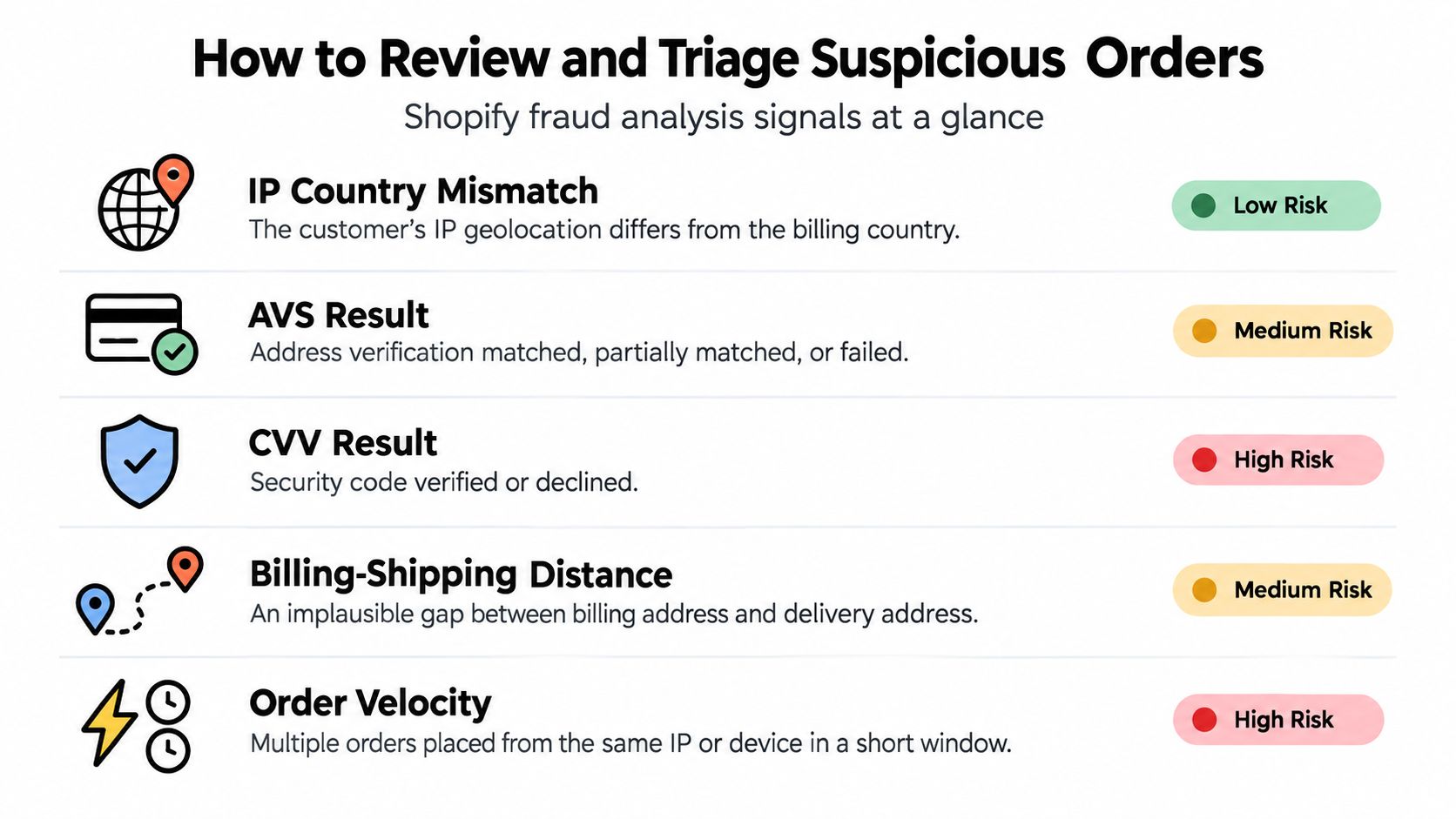
Start with Shopify's Fraud analysis card on the order page. Shopify automatically reviews each order and surfaces indicators including AVS, CVV, IP details, and unusual purchasing patterns. Use the risk label as a starting point, then inspect the underlying signals before deciding what happens next.
Build a consistent review queue
A workable queue separates orders that need immediate action from orders that only need documentation.
-
Check payment signals first. Review AVS and CVV results, then count payment attempts. A failed address check combined with repeated cards deserves more attention than an isolated location mismatch.
-
Check the session context. Compare the IP country with the billing country and shipping destination. Note whether the connection belongs to a proxy service or web host. A mismatch is a reason to verify, not automatic proof of fraud.
-
Review the commercial pattern. Look at product resale appeal, quantity, order value relative to the customer's history, shipping speed, and whether several orders arrived close together.
-
Choose a disposition. Fulfill when the evidence is coherent and the risk is limited. Place the order on hold when a customer can reasonably verify the information. Cancel and refund before fulfillment when the signals conflict and the buyer can't establish a credible connection to the order.
-
Record the decision. Add a short internal note with the signals reviewed, the customer's response, and the reason for fulfillment, hold, or cancellation. Consistent notes help the next reviewer make the same call.
Use Shopify filters and order tags to create a review queue. Keep medium-risk orders separate from high-risk orders, and give the team a clear service level for each queue. A manual process fails when every reviewer applies a different standard.
For practical guidance on interpreting the available indicators, use this Shopify fraud analysis walkthrough. Don't ask a customer to reveal sensitive card information. Contact them through the details on the order, ask them to confirm non-sensitive information, and refund before fulfillment if the response is evasive or inconsistent.
Blocking, Rules, and Automation Compared
No single control handles every Shopify fraud order. Hard blocking reduces exposure quickly, rules provide more nuance, and automation reduces repetitive review work. Each approach also creates a different false-positive risk.
| Approach | Coverage | False Positive Risk | Manual Effort | Chargeback Impact |
|---|---|---|---|---|
| Hard blocking | Strong against known IPs, countries, or connection classes | High when legitimate travelers, international buyers, or privacy users are included | Low after setup, but exceptions require attention | Can reduce suspicious traffic, but may suppress valid demand |
| Rules-based filters | Good for combinations such as risk status, address mismatch, velocity, and order caps | Moderate, depending on how narrowly rules are written | Medium, because rules need regular review | Helps stop recognizable patterns before fulfillment |
| Automation | Broad coverage across repeated signals and high-volume traffic | Varies with detection quality and tuning | Lower for routine cases, higher when exceptions need investigation | Can reduce review pressure, but poor rules can create cancellations |
| Layered controls | Covers traffic, checkout behavior, and order review together | Managed through allowlists, holds, and measured exceptions | Requires ownership and monitoring | Addresses upstream pressure and downstream disputes together |
Hard blocking works best when the business has a firm geographic policy. If a store doesn't ship to a country, blocking visits from that country can remove wasted checkout activity. It works less well as a universal response to VPNs or mobile networks, because legitimate customers also use those connections.
Rules are more precise when the merchant combines signals. For example, a rule can send an order to review when the risk status is high, the payment attempt count is unusual, and the shipping destination differs materially from the billing details. A rule that blocks every mismatch will create unnecessary cancellations.
Automation is useful for volume, but it still needs ownership. Review the decisions it makes, watch for legitimate buyers being held, and change the rules when product mix, shipping coverage, or acquisition channels change. For teams that need to extract product data from Shopify, the same discipline applies to data quality. Clean inputs make operational decisions more reliable, while automated collection without traffic controls can add noise.
A layered approach is usually safer than choosing one control. Start with traffic restrictions that match your actual shipping policy, add order-level rules, and preserve a manual review path for ambiguous cases. The Shopify fraud protection guide covers that broader approach without treating every suspicious signal as an automatic cancellation.
The Hidden Role of Traffic Quality in Fraud Pressure
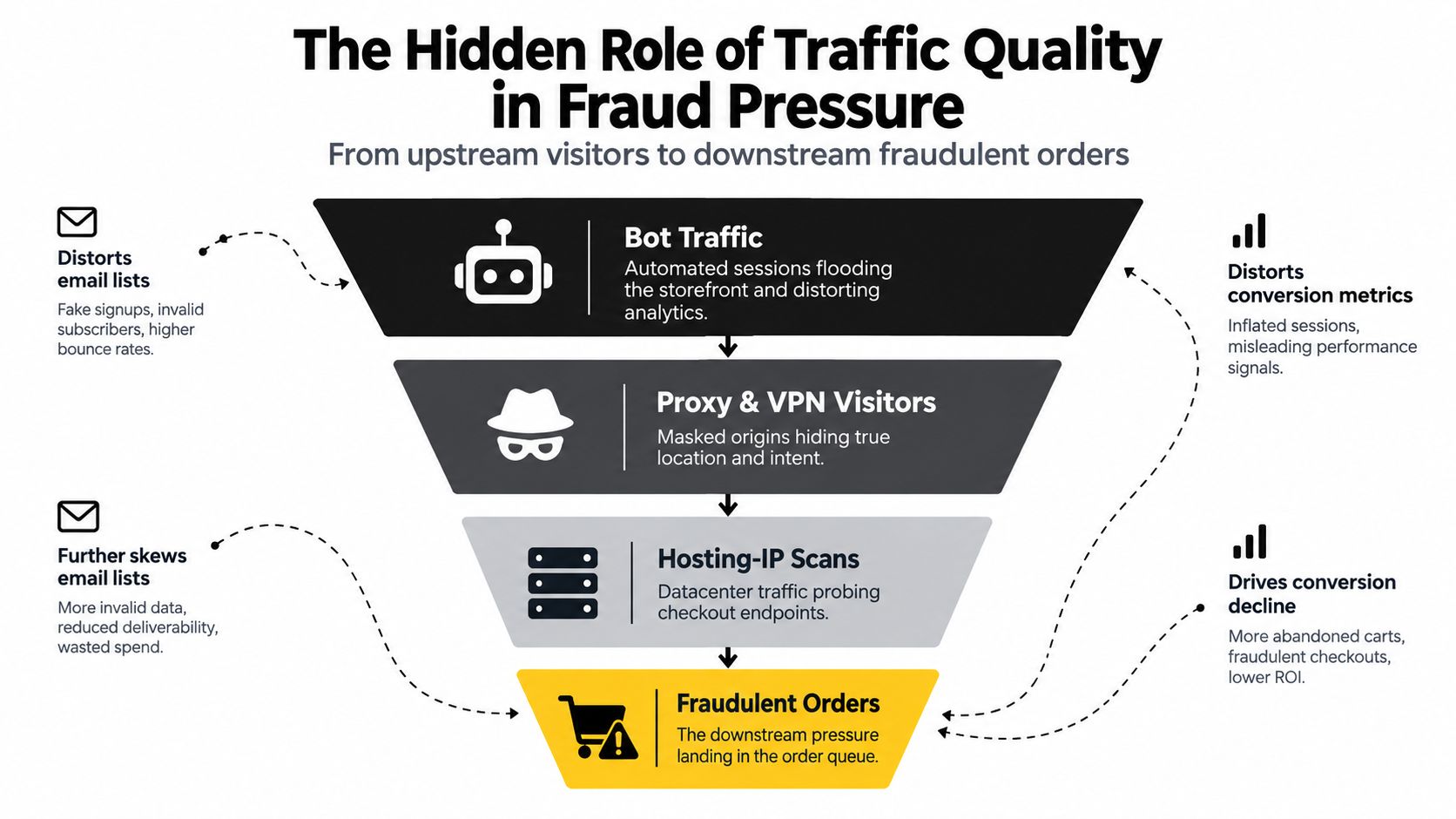
A fraudulent order is often the visible end of a longer traffic problem. Automated sessions may first scrape product pages, test forms, create disposable accounts, submit support requests, or join email lists. Only some of those sessions reach checkout, but the earlier activity can already damage reporting and consume staff time.
Bot traffic can inflate sessions and make conversion rates look weaker or stronger than they really are. Proxy and VPN visitors can create sudden regional spikes that resemble successful campaigns. Hosting-IP scans may probe checkout endpoints without behaving like a normal shopper.
Watch the symptoms upstream
Look for a connected set of changes rather than one suspicious order:
- Session distortion: A region, device class, or referral source suddenly produces unusual session volume.
- Weak engagement: Visitors create repeated page views or form submissions without normal browsing behavior.
- Email contamination: Disposable addresses enter the list without meaningful product engagement.
- Support noise: Agents receive repetitive questions, fake requests, or messages that never become genuine conversations.
- Order spikes: A burst of orders follows the traffic anomaly, often concentrated in easy-to-resell products.
The practical benefit of upstream filtering is workload reduction. If the store removes abusive sessions before they reach account creation, checkout, support, or reviews, fewer suspicious events reach the teams that must investigate them.
That doesn't mean every unusual visitor should be blocked. A traveler, privacy-conscious buyer, or international customer may look different from the store's typical shopper. The merchant should compare the traffic signal with shipping policy, payment evidence, order history, and customer response.
The Shopify bot protection guide explains why traffic classification belongs beside order review. The goal isn't to create a perfect label. It's to stop treating contaminated demand as genuine demand and to reduce the number of suspicious sessions that become expensive orders.
Where Securify fits
Securify fits upstream of Shopify's order-level review process. It can identify and mitigate bot traffic, VPN and proxy abuse, suspicious sessions, and hosting-IP visitors, while geo-blocking rules can restrict visits from countries the store doesn't serve or ship to. Those controls can reduce the volume of masked or automated activity reaching product pages and checkout.
It doesn't replace Shopify fraud analysis, payment-gateway risk scoring, or a manual review queue. It can't read card data, and it doesn't guarantee zero chargebacks. Merchants still need to decide whether an order should be fulfilled, held, or canceled.
Use traffic controls alongside order rules, then monitor legitimate international shoppers and travelers for false positives. Merchants can review the app on the Securify on the Shopify App Store before deciding which traffic categories belong in a block, allow, or review policy.
Securify gives Shopify merchants a way to inspect and control bot, VPN, proxy, hosting-IP, and geo-based traffic before those sessions add pressure to checkout and manual review queues. Visit Securify to assess traffic quality and decide where upstream controls belong in your fraud workflow.
People Also Ask About Shopify Fraud Orders
What should I do with a high-risk Shopify order?
Review the full fraud analysis, payment results, IP details, addresses, product pattern, and customer history. Fulfill only when the evidence is coherent, place the order on hold when verification is reasonable, and cancel and refund before fulfillment when the buyer can't establish a credible connection to the purchase.
Should I cancel every Shopify fraud order?
No. A single IP mismatch or address difference can have legitimate explanations. Cancellation becomes more defensible when several independent signals align, such as repeated payment attempts, failed AVS or CVV checks, unusual order velocity, masked hosting traffic, and an implausible delivery pattern.
Can Shopify fraud analysis prevent every fraudulent order?
No. Shopify fraud analysis helps identify risk indicators and assigns low, medium, or high risk to eligible card orders, but it doesn't replace merchant judgment. It also can't make upstream traffic clean or eliminate every form of first-party misuse.
How can I reduce manual fraud review work?
Create a consistent queue with Shopify filters and tags. Route obvious low-risk orders to normal fulfillment, send ambiguous orders to a hold queue, and reserve immediate cancellation for combinations of signals that your team has defined in advance.
Why do legitimate customers get flagged?
Travelers, mobile users, international buyers, and people using privacy services can create location or connection mismatches. Review the complete payment and order context before blocking or canceling, and maintain an exception process for customers who can verify the purchase.
What data should I keep for a disputed order?
Keep order details, fulfillment and delivery records, billing and shipping information, customer communications, and relevant IP or country data. Shopify notes that chargeback responses can require evidence of this kind, so record decisions before the order leaves the warehouse.