
· shopify fake orders · shopify fraud · fake checkouts · chargeback prevention · shopify bot traffic
Shopify Fake Orders: What They Are and How to Stop Them
Learn how to spot, block, and stop Shopify fake orders before they distort your analytics, burn ad spend, and trigger costly chargebacks.
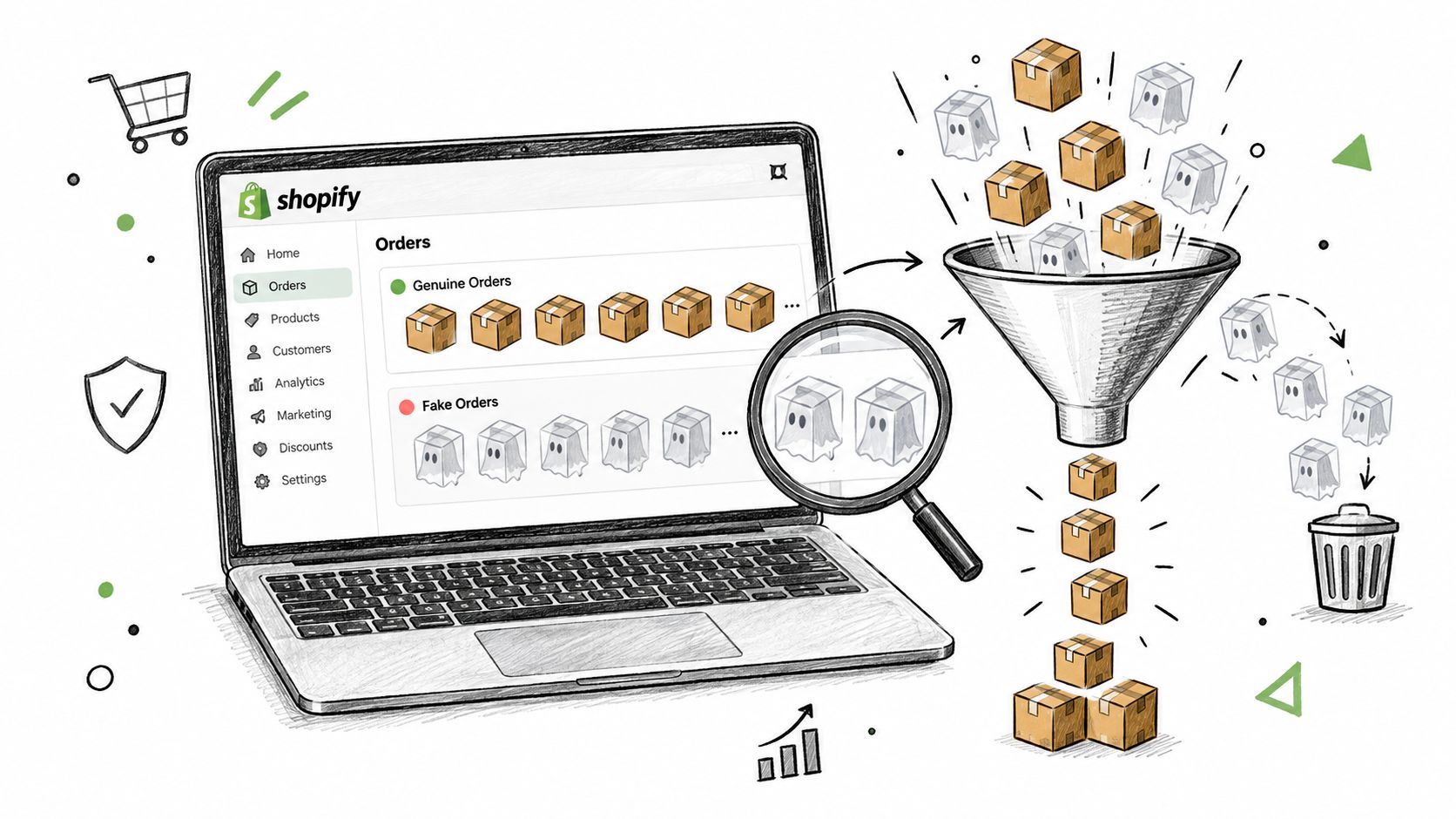
You open Shopify at 7 a.m. and find fifty new orders stacked against two real ones. Most are free authorizations or oddly small totals, and nearly all arrived inside the same twenty-minute window. Customer notes contain random strings, checkout activity has spiked, and your traffic report no longer resembles the business you went to bed with.
That mess is usually described as fraud, but Shopify fake orders are a broader upstream problem. A fake order is any paid or unpaid order placed without genuine purchase intent. That includes card-testing attempts, inventory hoarding, manual fraud tests, coupon abuse, and bot-driven checkouts that never result in a legitimate shipment.
Chargebacks happen later. Fake orders happen first, and they can damage your analytics, ad learning, email workflows, inventory records, and fulfillment queue before a bank dispute ever appears. Shopify's own guidance warns that bots can create unusual traffic patterns, free orders, repeated customer details, and machine-like search strings that make normal growth difficult to separate from abuse (Shopify's bot-activity guidance).
Table of Contents
- What Shopify Fake Orders Actually Look Like
- The Main Types of Fake Orders Hitting Shopify Stores
- How Fake Orders Pollute Your Store and Ads
- Detection Signals You Can Audit Today
- Mitigation Options From Manual Review to Pre-Checkout Filtering
- The Block vs Challenge Tradeoff Most Guides Skip
- A 30 60 90 Operating Rhythm for Fake Orders
- Where Securify Fits
- People Also Ask About Shopify Fake Orders
What Shopify Fake Orders Actually Look Like
You open the store and see order activity climbing while revenue stays flat. Checkout events surge, genuine customers do not, and one traffic source suddenly appears to convert well. The store looks busy, but the new activity may be card-testing traffic, inventory hoarding, or analytics pollution rather than demand.
The clearest warning is a burst of $0.00 orders or authorizations, especially when customer details, addresses, or device patterns repeat. Shopify's guidance flags unusual traffic, free orders, repeated customer information, and machine-like activity as signs of bot abuse (Shopify's bot-activity guidance). Treat the pattern as an upstream traffic problem, not merely a payment dispute waiting to happen.
Operational rule: Treat a sudden order burst as an investigation trigger, not as revenue.
Some fake orders look ordinary. A reseller can reserve scarce stock with valid payment details. A fraudster can place one carefully prepared order to test a stolen card and shipping address. A discount abuser can create a conversion that adds little or no margin. These cases require context, not an automatic block.
Use a challenge when the signal is suspicious but the buyer could be genuine. Reserve a hard block for repeated automation, clearly invalid details, or activity that keeps damaging checkout and inventory operations. Blocking everything protects short-term metrics while rejecting legitimate customers. Challenging nothing leaves the door open to abuse.
Fake orders versus chargebacks
A chargeback is a downstream financial event. A fake order is the upstream behavior that can waste fulfillment time, distort reporting, and create payment risk before any dispute appears.
Order-only monitoring misses part of the attack. Shopify's guidance notes that card-testing and bot checkout attempts may not appear as abandoned checkouts. Review payment attempts, risk signals, and traffic behavior alongside completed orders.
The operational effects fall into three buckets:
- Analytics pollution: Fake sessions and checkouts weaken traffic and conversion reporting.
- Ad-learning damage: Advertising systems receive conversion signals from people or scripts with no purchase intent.
- Operational drag: Staff review, cancel, refund, restock, and answer messages created by abusive activity.
Audit tip: Compare orders with sessions across the last 30 to 90 days. A single noisy day is a clue. A repeated pattern across that window indicates a control problem.
The Main Types of Fake Orders Hitting Shopify Stores
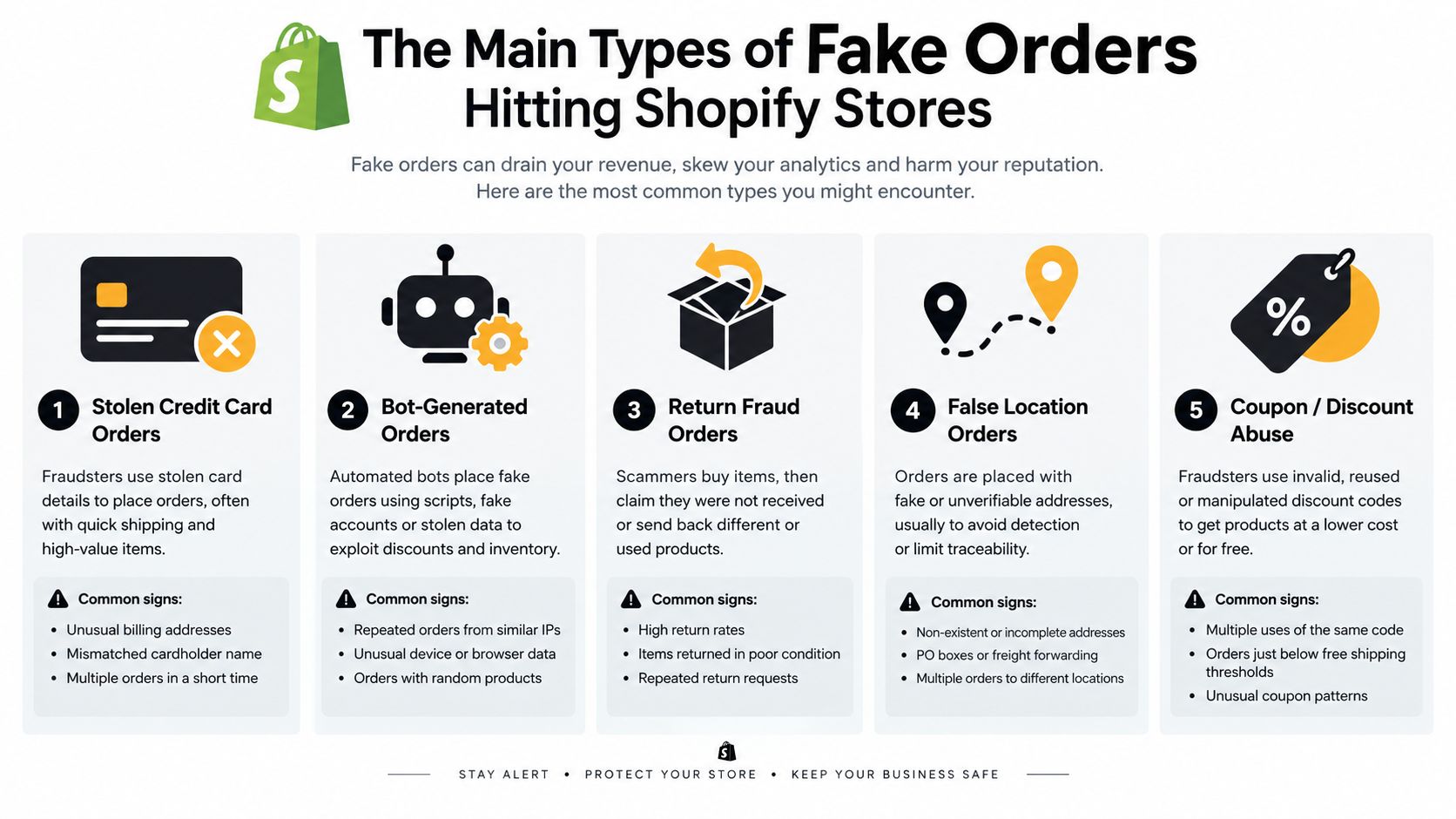
Not every suspicious order is the same attack. Classify the behavior before you write a rule, because the wrong control can block good buyers while leaving the actual abuse untouched.
Card testing
Card testing is usually the fastest and loudest pattern. Scripts submit many small or free authorization attempts using stolen card details. Look for velocity, repeated billing postal codes, similar device or network characteristics, and customer records that differ only slightly.
These attempts hurt analytics first, then payment operations. Some won't become completed orders, which is why you should inspect checkout and payment activity rather than relying only on the order list. For a deeper look at upstream bot abuse, use this guide to Shopify bot protection.
Inventory hoarding
Inventory hoarding is slower. A person or script adds scarce variants to carts or places orders designed to keep products away from other buyers. The payment method may be legitimate, which makes the behavior harder to identify from risk scoring alone.
The strongest signal is inventory behavior, not just payment risk. Watch for repeated orders targeting low-stock products, cancellations after stock is unavailable, and customer histories that show no normal buying pattern.
Manual fraud tests
A manual fraud test may be one clean-looking order. The buyer is checking whether a card, address, or account can pass your controls. The fingerprint is deliberate behavior, often a new customer, unusual location relationship, or a mismatch between billing and shipping information.
This type can hurt margin and create chargeback exposure even when the order has no obvious burst pattern. Shopify fraud analysis evaluates signals including AVS, CVV, billing and shipping details, proxy detection, device or network behavior, and multiple card attempts (Shopify fraud analysis).
Coupon abuse
Coupon abuse is quieter. Customers, discount hunters, or bots combine welcome offers, referral links, and abandoned-cart discounts to manufacture conversions that don't support your margin.
The useful signal is coupon-stacking depth and customer history. A single discount is normal. Repeated combinations tied to new accounts, shared details, or low-value orders deserve review.
How Fake Orders Pollute Your Store and Ads
Fake orders create problems before a chargeback appears. Card-testing bots, inventory hoarders, and automated checkout scripts can make weak traffic look like customer demand, leaving every downstream system to work with contaminated signals.
In Shopify analytics, fake checkouts can inflate traffic-source activity, conversion reporting, average order value, and apparent product demand. A free or canceled order still enters the operational picture unless your team separates genuine purchases from automated or abusive sessions. Review the path to checkout, not only the final order record. A burst of checkout activity with shallow browsing and little customer history points to a traffic-quality problem.
Advertising systems can absorb the same false intent. If suspicious visitors reach checkout or trigger a purchase event, campaign algorithms may treat them as valuable prospects. That can distort audience building, retargeting, and budget allocation. Your ads then seek more visitors who behave like the bots that polluted the original signal.
Email workflows receive the fallout too. Fake accounts can trigger welcome messages, abandoned-cart sequences, order confirmations, and shipping notifications. Disposable inboxes produce little engagement, while repeated abusive signups make segmentation and lifecycle reporting less reliable.
The operational chain
| System | What fake orders do | Metric that breaks | How to audit |
|---|---|---|---|
| Shopify analytics | Add non-genuine sessions and orders | Conversion, average order value, and source reporting | Compare order patterns with session quality and customer history |
| Ad platforms | Send false checkout or purchase signals | Audience quality and campaign efficiency | Review conversions tied to suspicious devices, emails, or sessions |
| Trigger flows for disposable or abusive accounts | Deliverability and engagement quality | Segment recent signups by order status and repeated details | |
| Fulfillment | Push invalid orders into picking and shipping queues | Labor time, inventory accuracy, and refund workload | Review free, canceled, held, and high-risk orders before release |
Pull last week's orders and sort by zero-value orders, repeated customer details, and checkout sessions without a normal browsing path. Then ask: how many orders would your team reject if the customer had to prove genuine intent?
Use a longer review window before changing campaign settings. As noted earlier, short spikes can make bot activity look like growth (Shopify's bot-activity guidance). Compare suspicious traffic with real browsing depth, repeat purchasing, and fulfillment outcomes.
Do not block every unusual visitor. Blocking reduces fake conversions and protects inventory, but an aggressive rule can reject legitimate customers. Challenge uncertain sessions instead, using a verification step before checkout or payment. Reserve hard blocks for repeated automation, obvious card testing, and activity that consumes stock without credible buying intent.
Detection Signals You Can Audit Today
A fake order is rarely obvious on one signal. A single AVS miss can hit a real buyer. A proxy marker can belong to someone protecting privacy. The useful question is whether several weak signals line up in the same order, same session, or same customer trail.
Start with the order timeline and the fraud analysis card. Shopify assigns low, medium, or high risk using network data and machine learning, and it checks billing and shipping differences, proxy use, unusual device or network activity, multiple card attempts, and AVS and CVV results. Read those signals as a pattern, not as isolated failures.
Look for these combinations:
- Payment mismatch: AVS or CVV problems carry more weight when billing and shipping details do not match.
- Masked location: A proxy or VPN marker matters more when the session location clashes with the customer's stated country.
- Disposable identity: A throwaway email is more suspicious when the same address pattern shows up across several orders.
- Repeated authorizations: Free or low-value attempts in a tight sequence point to card testing.
- Device repetition: Several customer accounts sharing an abnormal device pattern point to scripted or coordinated activity.
- Machine-like input: Random customer notes, search strings, or form values often separate automation from normal shopping behavior.
For teams that need a clearer view of device-level signals, this analysis of browser fingerprinting tools explains how browsers can be distinguished without depending on one identifier.
Pull the latest orders and sort by zero-value and high-risk status. Then inspect the timeline for repeat attempts, checkout sessions with no normal browsing path, and customer records that reuse the same details. Flag the order when two weak signals appear together. Escalate it when a third signal supports the same explanation.
Example: AVS fails, billing and shipping do not match, and a proxy marker appears in the same order. Hold it for manual review. Do not auto-cancel it on a single odd field. The fraud analysis workflow gives your team a clean way to make that call before fulfillment.
Mitigation Options From Manual Review to Pre-Checkout Filtering
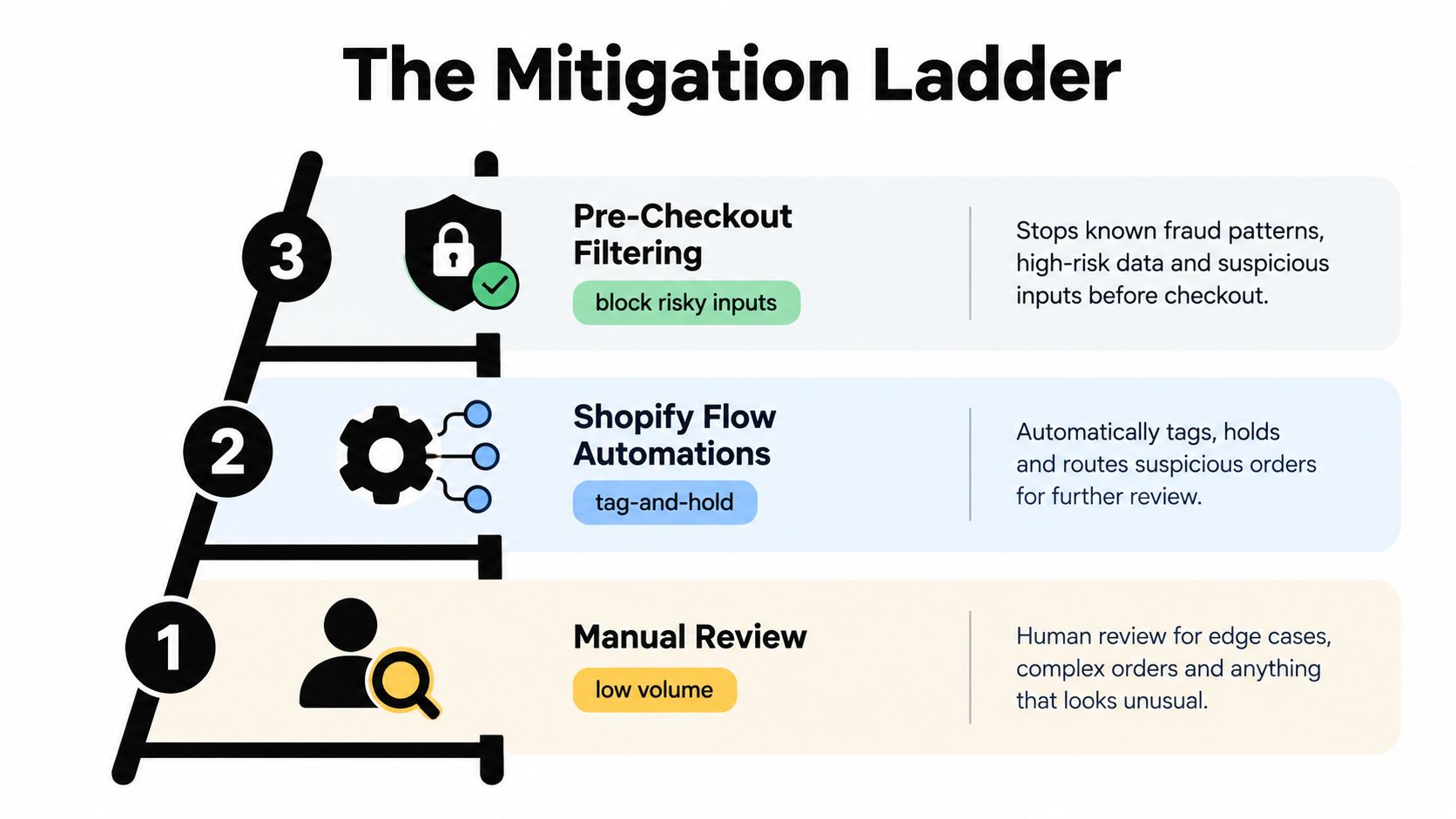
The right control depends on where the abuse enters and how much review your team can absorb. Start with the least disruptive layer, then move upstream when post-checkout work stops being manageable.
Manual review
Manual review works when the queue is small and the order value justifies attention. Check the fraud analysis, payment results, customer history, and address relationship before fulfillment.
Its weakness is timing. The bot has already consumed checkout resources, entered your analytics, and possibly triggered email or ad events. Review can stop shipment, but it can't clean the upstream data.
Shopify Flow automations
Shopify Flow can tag, hold, capture, or cancel orders based on risk triggers. Shopify recommends using Flow to automate handling for potentially fraudulent orders and to hold or cancel orders before fulfillment where appropriate (Shopify order protection).
This is a strong operational layer, but it still reacts after checkout. It reduces staff workload without preventing the visit, session, or checkout attempt.
Fraud Control rules
Shopify's Fraud Control app can block checkouts before they become orders using conditions such as email, IP address, ZIP code, and address attributes (Shopify Fraud Control). Rules are useful when a pattern is clear, but broad country or location blocks can reject legitimate buyers.
Pre-checkout filtering
Pre-checkout filtering addresses the upstream problem. It can screen traffic before a visitor reaches checkout, which is the only layer that can prevent bot sessions from polluting analytics and triggering downstream workflows.
Decision rule: Use post-checkout controls to protect fulfillment. Use upstream controls to protect measurement.
For high-risk order handling practices, see this guide to Shopify high-risk orders. The practical point is simple. If you only cancel after checkout, you may stop the shipment while leaving the ad signal, email event, and analytics pollution behind.
The Block vs Challenge Tradeoff Most Guides Skip
Aggressive blocking can become its own revenue leak. A legitimate international buyer may use a proxy. A returning customer may buy from a new device. A wholesale-style order may have billing and shipping details that look unusual but are commercially valid.
Use three paths instead of one blunt rule.
Hard-block when the evidence is unambiguous. A masked connection, disposable identity, failed payment verification, and repeated abnormal behavior together justify a firm stop.
Challenge when the signals stack but remain ambiguous. Ask for a CAPTCHA, an email confirmation, or another step-up action that adds friction without immediately rejecting the buyer.
Monitor and release when the customer matches a known-good pattern. A returning customer with a strong order history may deserve review rather than a block, even if the current device or location looks different.
The risk of overblocking extends to paid traffic. If your rules reject legitimate visitors from a campaign, bounce rate rises and the ad platform receives another distorted signal. You may reduce fake orders while making the campaign look worse than it is.
Review rejected and challenged orders every month before tightening a rule. If legitimate customers repeatedly appear in the rejected group, change the rule. A control that removes revenue is not a successful fraud control.
A 30 60 90 Operating Rhythm for Fake Orders
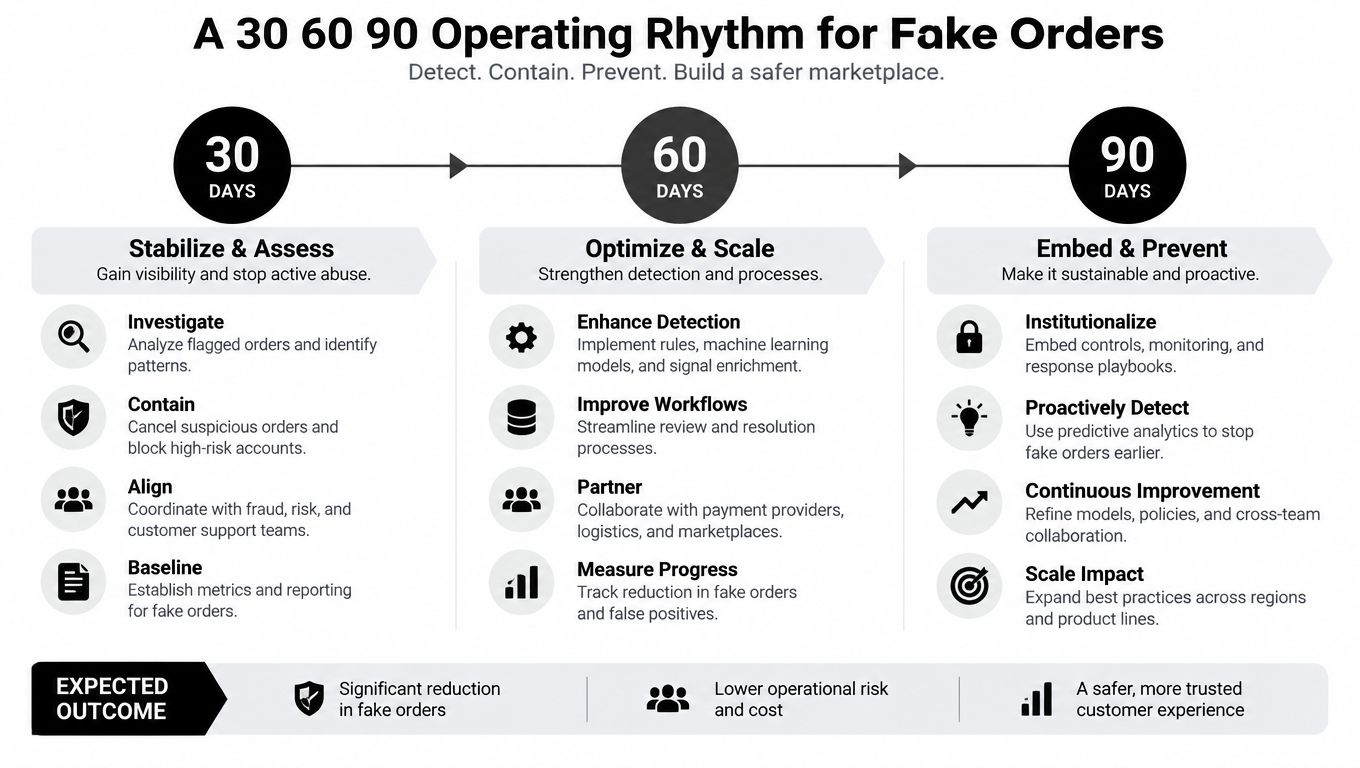
Fake-order defense works better as an operating cadence than as a one-time cleanup. The sequence is measure, deploy, tune, govern.
The first 30 days
Export the previous 90 days of orders and tag suspected fake activity by type. Separate card testing, inventory hoarding, manual fraud tests, and coupon abuse. Record which signals appeared, whether the order was fulfilled, and whether staff had to intervene.
Don't skip the baseline. Without it, your team will add rules based on the latest noisy burst and create false positives that are difficult to unwind.
Days 31 through 60
Deploy layered controls in priority order. Start with order tagging and hold workflows, then add narrowly defined rules for repeated details, clear payment-risk patterns, or known abusive behavior.
Measure what each control changes. A rule that reduces canceled orders but increases legitimate review volume may need adjustment. A rule that blocks checkout activity but leaves the same suspicious traffic in your reports isn't solving the full problem.
Days 61 through 90
Compare chargeback activity, conversion quality, rejected orders, and manual review volume. Retire signals that flag too many legitimate buyers. Keep a written record of why each rule exists and which attack pattern it targets.
After the first cycle, run a weekly review. Check new bursts, repeated customer details, inventory pressure, and campaign-level anomalies. Bot behavior changes after controls are deployed, so a rule that worked last month may become noise later.
The goal isn't a store with zero suspicious activity. The goal is a store where your team can explain what happened, stop the harmful behavior early, and preserve trustworthy data.
Where Securify Fits
Securify fits upstream, before or alongside Shopify's order-level fraud checks. It screens storefront traffic for bot activity, VPN or proxy use, geo-based risk, and other suspicious patterns before those visitors create checkout noise. That makes it relevant for stores dealing with bot storms, free-authorization spam, or repeated low-value test orders.
It doesn't replace Shopify Fraud Analysis, Shopify Flow, or checkout rules. Those tools still matter for orders that reach the payment and fulfillment stages. Securify adds a pre-checkout filtering layer for merchants who need to reduce non-genuine sessions before they affect analytics and downstream workflows. Review Securify on the Shopify App Store to assess whether that upstream approach fits your store.
Shopify generally doesn't refund the merchant for every fraudulent order. The merchant absorbs the loss unless eligible protection applies, so chargeback rates should be kept as low as possible.
Higher chargeback ratios can trigger payment-processor review or reserve holds. Free or fully discounted orders can still be fake because they distort analytics, consume inventory, and train advertising systems on non-buyers.
Monitor a new control setup for at least 60 to 90 days of stable data before assuming the problem is controlled. Bot patterns can shift after rule changes and during seasonal traffic changes.
If fake orders are polluting your Shopify analytics or creating repeated checkout abuse, Securify offers upstream traffic filtering for bots, VPN and proxy traffic, and suspicious storefront activity. Visit Securify to evaluate your traffic quality before the next fake-order burst reaches checkout.
People Also Ask About Shopify Fake Orders
How do I identify fake orders on Shopify?
Start with Shopify's fraud analysis and order timeline. Look for repeated free or low-value attempts, AVS or CVV problems, billing and shipping mismatches, proxy indicators, unusual device behavior, and repeated customer details. One signal can be innocent, but several signals pointing to the same pattern deserve a hold or challenge.
Can I automatically cancel high-risk Shopify orders?
Yes. Shopify Flow can automate actions such as tagging, holding, capturing, or canceling orders based on risk triggers (Shopify order management guidance). Test the workflow against known-good orders before enabling automatic cancellation.
Are free Shopify orders always fraudulent?
No. A free order can be legitimate, such as a replacement or promotional item. A burst of free orders with repeated details, unusual customer information, or automated checkout behavior is a stronger warning sign than one isolated order.
Should I block every VPN or international customer?
No. VPN use and international location can be legitimate. Block when those signals combine with stronger evidence, challenge when the pattern is uncertain, and review rejected orders regularly to catch false positives.
Do fake orders cause chargebacks?
They can, but not every fake order becomes a chargeback. Card testing, stolen payment details, and deliberate fraud tests may create disputes later, while inventory hoarding, coupon abuse, and bot sessions can damage operations without producing a bank dispute.