
· shopify contact form spam · shopify bot traffic · ecommerce fraud prevention · shopify spam filter · stop fake submissions
Shopify Contact Form Spam: Causes and Fixes
Stop Shopify contact form spam from polluting your support queue and analytics. Learn how to identify automated bots and apply layered prevention methods.
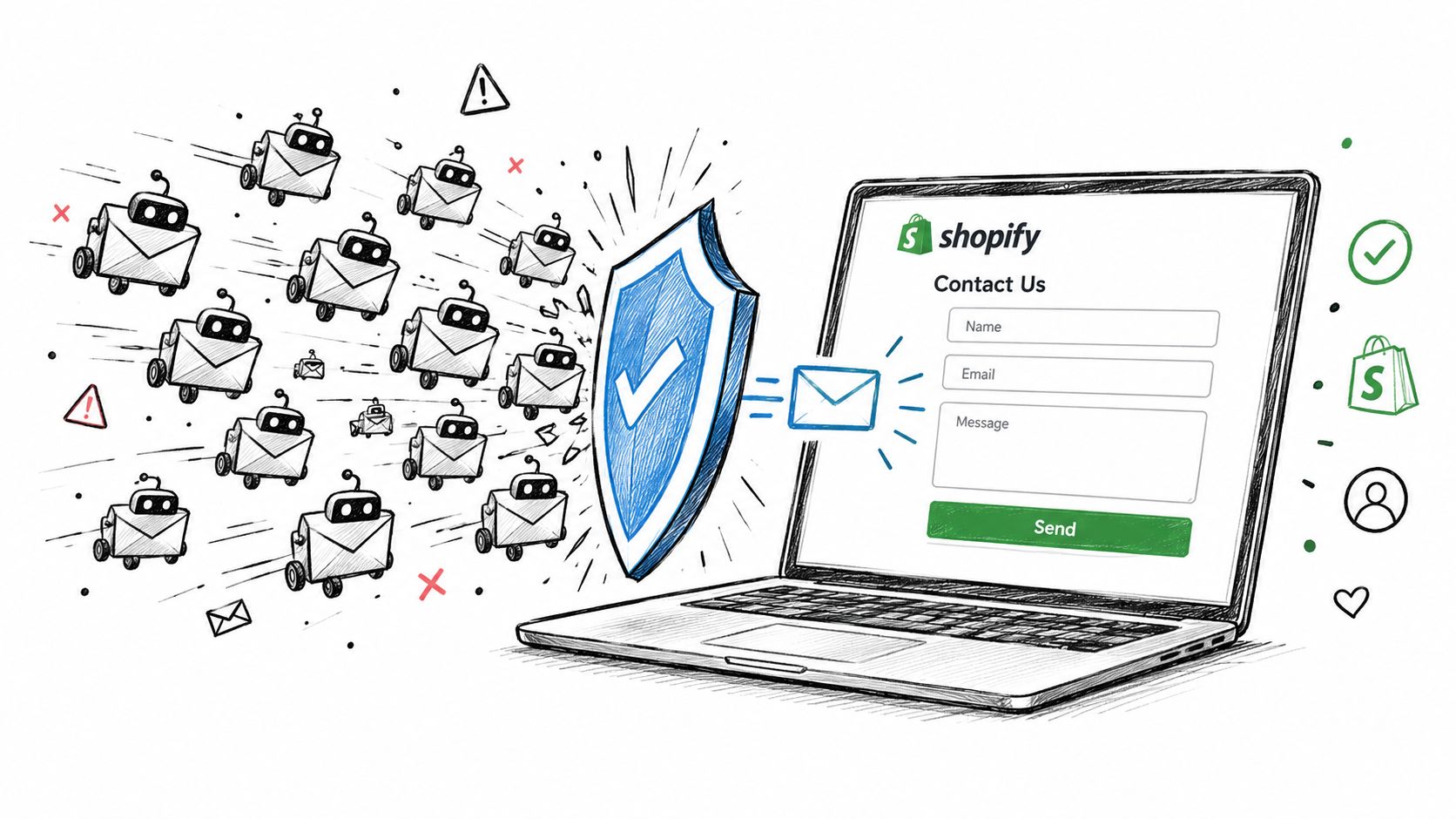
You open the support queue and find the same pattern again: vague SEO pitches, suspicious phone numbers, generic product questions, and links your team doesn't recognize. The messages look different at first, but many use nearly identical wording and arrive often enough to bury real customer inquiries.
That is Shopify contact form spam. Deleting it treats the symptom. The larger problem is traffic quality. Automated or abusive sessions can reach your forms, distort analytics, consume support time, and make genuine conversion activity harder to identify.
Table of Contents
- How Shopify Contact Form Spam Actually Works
- Why Automated Bots Target Storefront Forms
- How to Identify Fake Submissions and Bot Traffic
- Comparing Native Filters and Layered Prevention Methods
- Connecting Form Abuse to Broader Traffic Quality Issues
- Where Securify fits
- Frequently Asked Questions About Shopify Form Spam
- Why am I still getting Shopify contact form spam when CAPTCHA is enabled?
- Should I block every VPN visitor to stop contact-form spam?
- How can I measure the false-positive rate of my spam filter?
- What should I do if a legitimate customer gets caught by a honeypot?
- How do I know whether form spam is connected to fake accounts or fraud?
How Shopify Contact Form Spam Actually Works
Contact forms are public, repeatable endpoints. A script can load a page, submit the same message across many stores, and move on without creating an account or completing checkout. That low effort makes form abuse cheap to repeat.
Shopify merchants have documented this pattern for years. In an August 2021 Shopify Community discussion, store owners reported vague claims, suspicious phone numbers, and addresses using “shopify-experts.org.” Shopify staff identified the messages as spam or phishing attempts and said Shopify does not distribute addresses using that domain.
Operational reality: The inbox is often where abuse becomes visible, not where it begins.
The same traffic can touch other parts of a storefront. A merchant may see unusual sessions, repeated form requests, fake newsletter signups, customer-account attempts, or support tickets linked to similar sources. Even without a fraudulent order, staff must review and delete the submissions, then check whether a genuine inquiry was buried among them.
The commercial impact is indirect but measurable in day-to-day operations. Inflated interactions make conversion reporting less reliable, and overloaded queues delay replies to shoppers or customers with order problems. A practical Shopify bot protection guide treats these events as traffic-quality signals rather than isolated email annoyances.
Native filtering involves a trade-off. Shopify analyzes contact-form submissions and adds a [SPAM] subject prefix to messages it flags, while still delivering them so legitimate inquiries are not discarded. That label reduces sorting uncertainty, but merchants still need a review process and broader controls for repeated abuse.
Why Automated Bots Target Storefront Forms
A small store can receive recurring automated abuse without being singled out. Imperva's 2025 Bad Bot Report found that automated traffic represented 51% of all web traffic in 2024, while bad bots accounted for 37% of total internet traffic and 59% of traffic in the retail sector. The Imperva report summary does not measure Shopify contact-form submissions specifically, but it shows the scale of the wider traffic-quality problem.
Why forms are easy to reuse
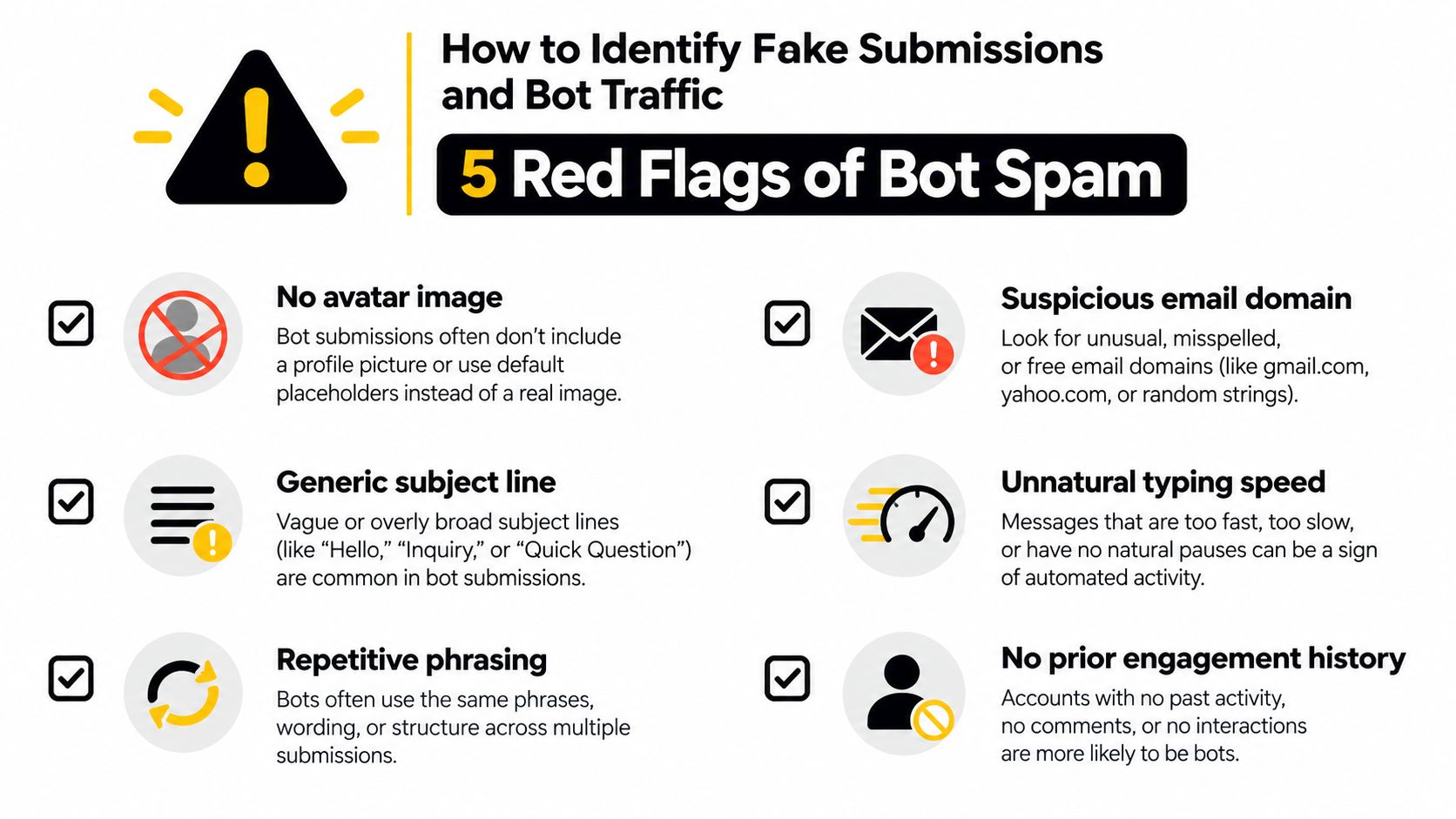
Storefront forms usually follow a predictable pattern. A script can locate the endpoint, populate an email address and message, then submit the request repeatedly without understanding the brand or products.
Bots may use forms to:
- Inject links: Messages can include phishing destinations, suspicious offers, or URLs designed to redirect staff.
- Test infrastructure: Repeated requests reveal which pages, networks, or controls respond.
- Poison lists: Fake signups and fabricated details degrade email data and create poor audience segments.
- Create workload: A stream of low-value submissions forces staff to inspect messages with no commercial value.
- Probe trust: A form submission can precede account creation, cart activity, or checkout attempts.
Public forms also make distribution cheap. The same script can target thousands of storefronts at once, so the marginal cost of another submission is close to zero. Volume, rather than careful targeting, is the signature of this abuse. Coordinated campaigns with identical wording have been documented across multiple stores since 2021, showing that centrally distributed spam is not specific to one merchant.
Why deleting messages isn't enough
Deleting a message removes the visible symptom, not the session that produced it. If the source continues loading pages, submitting forms, creating accounts, or triggering email workflows, the store keeps absorbing support and infrastructure costs.
That activity can also pollute analytics. Automated sessions may inflate visits and interactions, obscure genuine conversion rates, and make campaign performance harder to interpret. A merchant reviewing only the inbox may miss related account, cart, or checkout activity from the same traffic pattern.
The useful question is broader than how to stop one message. Identify what other storefront actions came from the same source, then apply controls at the points where the traffic enters. That approach treats contact-form abuse as a traffic-quality issue with operational consequences, not merely unwanted email.
How to Identify Fake Submissions and Bot Traffic
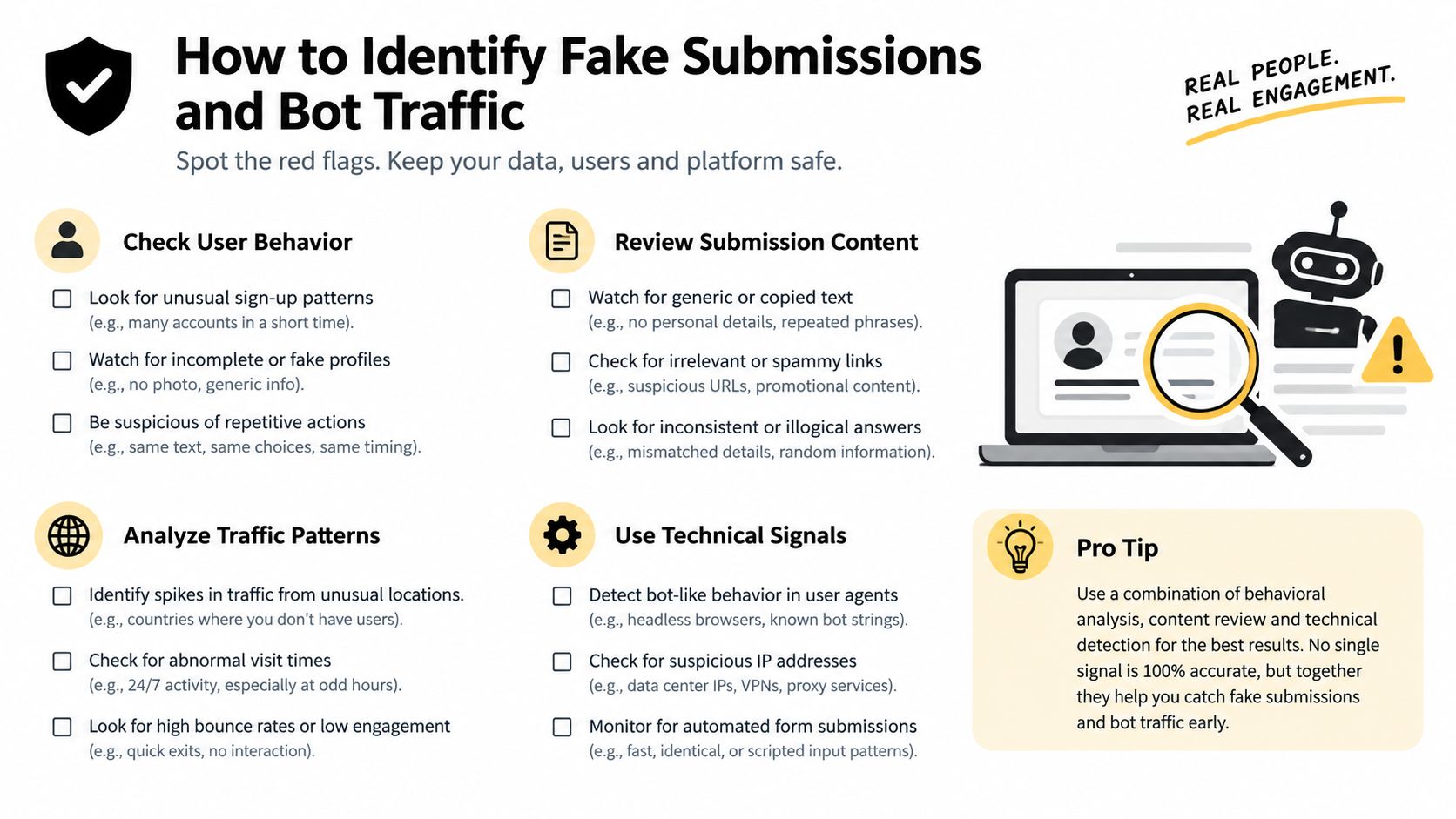
Start with the message, then add session context. A single strange phrase isn't proof of automation, but repeated content combined with unusual timing or network behavior is much stronger evidence.
Read the submission pattern
Compare suspicious messages side by side rather than reviewing them one at a time. Shopify merchants have reported identical or nearly identical wording across multiple stores, along with suspicious sender domains, in the Shopify Community reports.
Look for these signals:
- Repetitive language: The same sentence structure appears across submissions, even when names or product references change.
- Generic intent: The sender claims to have found an issue but doesn't identify a product, order, or page.
- Suspicious links: The message asks staff to visit an unfamiliar destination or download something.
- Inconsistent identity: The claimed location, phone number, email domain, and language don't fit together.
- Unnatural timing: Multiple submissions arrive close together, or a form is submitted almost immediately after loading.
None of these signals should automatically block a real customer. A legitimate shopper can use a privacy network, write briefly, or contact you from a different region. Treat the signs as inputs to a classification process.
Add session-level evidence
Record more than the message body. Useful fields include form-load time, submission time, source network, user-agent consistency, repeated content fingerprints, and the number of requests associated with a session.
A submission that arrives immediately after page load is more suspicious when the same network also produces many form requests. Rotating VPN or proxy addresses, repeated browser signatures, and identical content across sessions strengthen the case for automation, but each signal has blind spots.
Human-assisted phishing, paid CAPTCHA-solving, and carefully written SEO pitches can pass a basic bot test. That is why a honeypot or timing check should act as a signal, not a complete security boundary. Content review and rate controls still matter.
Classify instead of deleting everything
Use three practical outcomes:
- Allow: The message has a specific product or order context and no unusual session indicators.
- Quarantine: The content or traffic looks suspicious, but a legitimate customer remains plausible.
- Reject: Multiple indicators point to scripted abuse, especially repeated content, impossible timing, or excessive request volume.
Track blocked spam, rescued legitimate inquiries, and false positives. The goal isn't to maximize blocked submissions. The goal is to reduce abusive workload without suppressing the customers your team needs to serve.
Comparing Native Filters and Layered Prevention Methods
Shopify's hCaptcha helps reduce automated submissions, but it doesn't answer every question about traffic quality. Shopify states that hCaptcha is enabled by default on supported forms, including contact forms, and uses visitor-behavior analysis to distinguish likely bots from legitimate users. Suspicious visitors may receive an interactive challenge, while flagged submissions can still arrive with a [SPAM] subject prefix, as described in Shopify's bot guidance.
That design protects against false positives, but it also explains why merchants can continue to receive contact-form spam after enabling CAPTCHA. A challenge can stop some automated submissions. It won't identify every human-assisted message, remove traffic already recorded in analytics, or explain whether the same visitor touched other parts of the store.
Shopify spam prevention methods compared
| Method | Primary function | Operational limits |
|---|---|---|
| Shopify hCaptcha | Assesses visitor behavior and challenges suspicious activity | Doesn't catch every human-assisted or sophisticated submission, and doesn't provide a complete traffic-quality diagnosis |
[SPAM] subject labeling | Makes Shopify's classification visible in the inbox | Labels suspicious messages but still delivers them for review |
| Honeypot field | Detects scripts that fill a hidden decoy field | Can miss scripts that target only known fields and can be bypassed by human-assisted abuse |
| Timing test | Flags submissions that occur unusually soon after form load | Fast genuine submissions and sophisticated automation can create ambiguous results |
| Server-side validation | Checks fields, timing, rate, and session signals before accepting or routing data | Requires implementation and careful thresholds |
| Content and fingerprint analysis | Finds repeated messages, links, and recurring patterns | Needs ongoing tuning and a review path for borderline cases |
| Rate limiting | Restricts excessive requests from a session or network | Shared networks and privacy tools can create false positives |
Where native controls stop
A layered approach combines native hCaptcha with server-side validation, rate limiting, behavioral telemetry, and downstream content analysis. Shopify also recommends monitoring analytics for spikes and recurring patterns that indicate bot activity.
A CSS-hidden honeypot can catch commodity scripts that enumerate and fill every input. A server-side timing check adds context by comparing form load and submission times. Neither should rely only on client-side JavaScript, because an attacker can bypass browser logic and submit directly to the endpoint.
Practical rule: Challenge suspicious visitors, quarantine uncertain messages, and reject clear automation. Don't treat every unfamiliar visitor as fraudulent.
For a broader view of how upstream signals relate to orders and review workload, see this guide to Shopify fraud protection. The useful decision isn't whether one control is “on.” It's whether your controls cover the full path from session to form to support queue.
Connecting Form Abuse to Broader Traffic Quality Issues
Contact-form spam often appears alongside other low-quality activity. The same automated network may load a form, create a customer account, join a newsletter, add products to a cart, and generate abandoned checkout records. Looking at each event separately hides the common source.
Recent industry summaries report that e-commerce forms represented 22% of observed spam in 2025, while contact forms represented 26%, indicating that form abuse belongs to a broader multi-surface pattern. The figures are reported in this industry summary of Shopify fake-account and spam activity. They describe observed spam categories, not the share of traffic on an individual store.
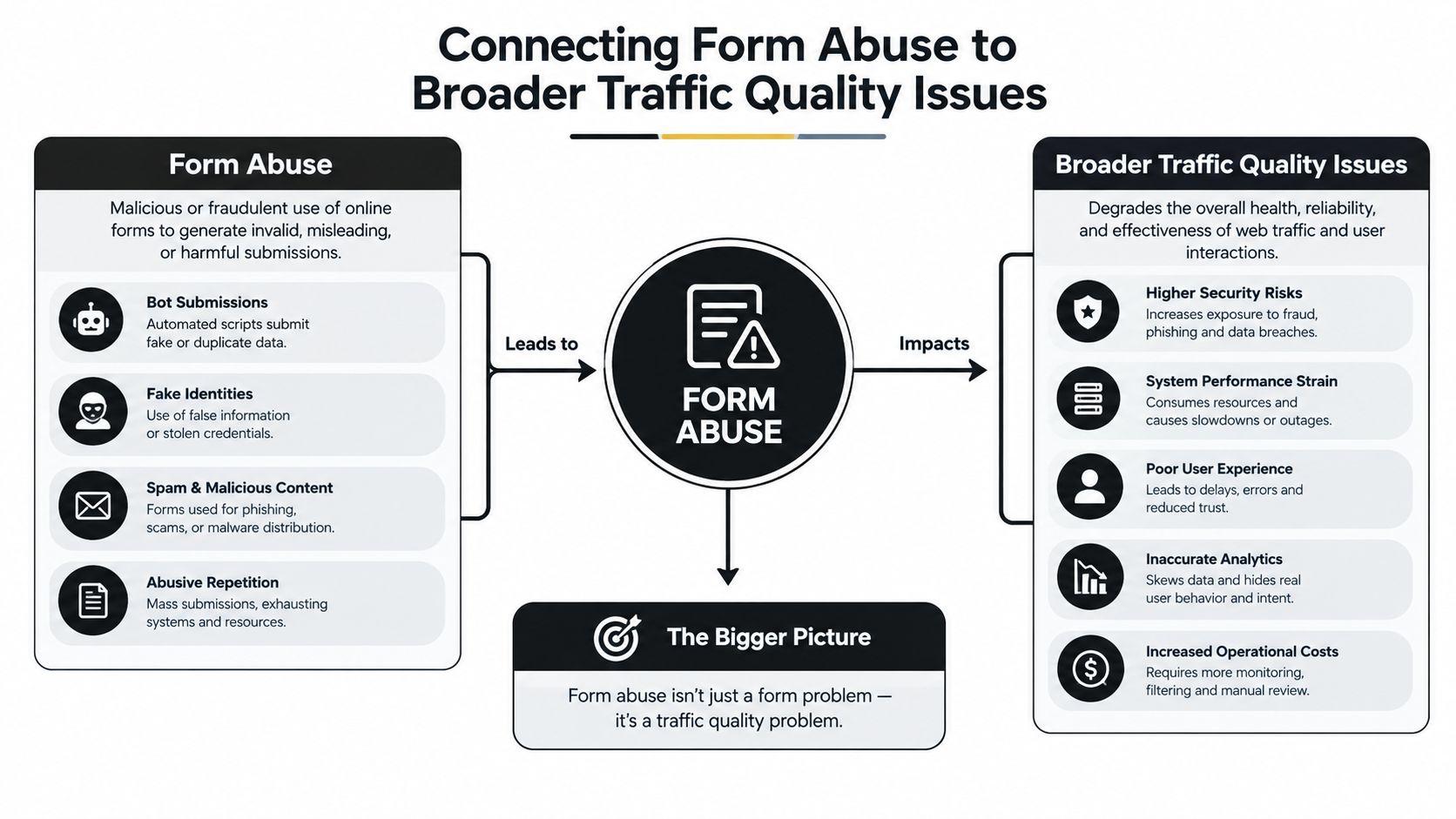
Build a shared event view
Connect form data with:
- Anonymous sessions: Check whether suspicious submissions came from sessions with repeated page loads, no meaningful browsing, or unusual navigation.
- Network signals: Look for recurring masked networks, proxy indicators, and inconsistent geographic information.
- Account activity: Compare form events with customer-account creation and newsletter signup attempts.
- Cart and checkout behavior: Review abandoned checkouts, repeated payment attempts, and zero-value activity that shares timing or network patterns.
- Support workload: Measure how many tickets or inbox items require manual triage after a traffic spike.
Privacy-conscious customers can look similar to abusive visitors at the network level. Don't block every VPN or unfamiliar region by default. Use multiple signals and preserve a path for legitimate customers to contact you.
Protect reporting, not just the inbox
When low-quality sessions enter analytics, marketing teams may misread engagement and conversion data. A traffic spike can look like campaign interest even when it comes from scripts repeatedly loading pages or submitting forms.
This also affects operations. Support staff spend time sorting messages, fraud reviewers investigate more events, and email systems may process records that don't represent real customers. Cleaner traffic classification gives the team a better basis for decisions about campaigns, staffing, and manual review.
Shopify's order fraud analysis provides additional context for orders. It evaluates signals such as address verification, card security checks, location and payment relationships, device or network activity, and attempts to use multiple cards. Shopify can provide a low-, medium-, or high-risk recommendation for eligible online credit-card orders, but the recommendation is intended for review, not as an automatic declaration of fraud.
Where Securify fits
Securify fits upstream of the contact form. Its Shopify traffic controls classify storefront sessions, detect bots and masked access patterns, and can apply blocking or geographic rules before abusive visitors continue into forms and connected workflows. That can help separate suspicious activity from genuine shoppers before it contaminates support queues, email lists, reviews, or analytics.
The Shopify connection is described through the Securify Shopify integration. Merchants evaluating customer-service workflows may also want a best Shopify support automation tool for organizing legitimate conversations after traffic filtering.
Securify doesn't replace Shopify's native hCaptcha, order review, or fraud analysis. It acts before or alongside those controls, giving teams another layer for traffic classification and early intervention. You can review Securify on the Shopify App Store if contact-form abuse is part of a wider bot or VPN problem.
Frequently Asked Questions About Shopify Form Spam
Why am I still getting Shopify contact form spam when CAPTCHA is enabled?
Shopify's hCaptcha can reduce some automated submissions, but it doesn't identify every abuse pattern. Human-assisted messages, scripted browsers that behave more like visitors, rotating networks, and legitimate-looking phishing inquiries can still reach the form.
Check whether the messages share content fingerprints, timing patterns, source networks, or user-agent characteristics. Also review whether the same sessions are creating accounts, signing up for email, or generating unusual cart activity. CAPTCHA is one control, not a complete explanation of traffic quality.
Should I block every VPN visitor to stop contact-form spam?
No. VPN use isn't proof of abuse. Real customers may use privacy tools, corporate networks, or shared connections, and a blanket block can suppress legitimate inquiries.
Use VPN or proxy status as one risk signal alongside submission velocity, content repetition, form timing, geography, and customer context. Quarantine ambiguous submissions and reserve hard blocks for combinations of signals that indicate clear abuse.
How can I measure the false-positive rate of my spam filter?
Create a review sample from both blocked and delivered submissions. Mark each item as confirmed spam, legitimate inquiry, or uncertain, then compare those labels with the action your controls took.
Track three outcomes separately: spam blocked, legitimate inquiries rescued, and legitimate messages incorrectly quarantined or rejected. Review the results after meaningful traffic changes and adjust thresholds gradually. A filter that blocks more messages isn't automatically better if it also hides real buyers.
What should I do if a legitimate customer gets caught by a honeypot?
Don't discard the event permanently. Route honeypot matches to a quarantine queue when the message has useful order, product, or service context and other risk signals are weak.
Review the form implementation as well. A decoy field should be hidden from normal users without interfering with accessibility tools or autofill behavior. Keep the honeypot check server-side, and combine it with timing and content signals rather than treating one populated field as conclusive proof.
How do I know whether form spam is connected to fake accounts or fraud?
Correlate timestamps, repeated message content, session identifiers, network indicators, account creation, checkout attempts, and support-ticket volume. Shopify also exposes IP and proxy information in order fraud analysis, and repeated activity from one address can lead to a temporary block in some circumstances.
The pattern matters more than one event. A contact submission alone may be harmless, while the same network repeatedly creates accounts, abandons checkouts, and triggers payment failures deserves a broader fraud review. Keep legitimate privacy-tool users in mind when interpreting network data.