
· bots and proxies · shopify bots · proxy detection · bot traffic · storefront fraud
Bots and Proxies on Shopify: What Merchants Need to Know
Learn what bots and proxies are, how they distort Shopify analytics, and how to detect and stop abusive traffic in your storefront.
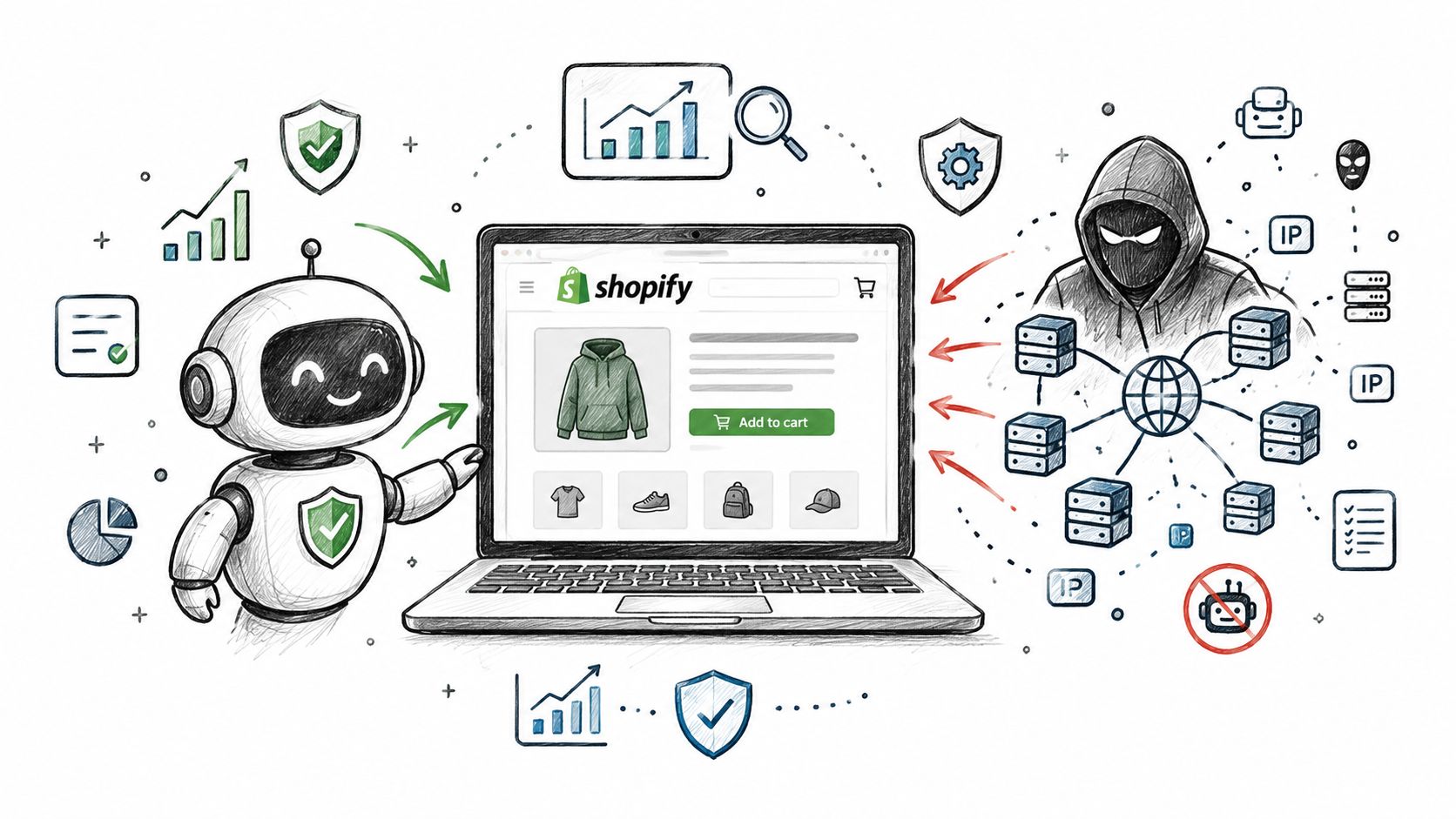
A US DTC merchant notices sessions climbing while conversion falls. Orders are appearing from unfamiliar geographies, the fraud-review queue keeps growing, and support is asking why abandoned carts and odd account activity are suddenly everywhere. The uncomfortable question is whether real customers are even seeing the store clearly in the data.
Bots and proxies are often the hidden variable. Bots create automated visits and actions. Proxies hide the network path behind those actions. Together, they can inflate sessions, distort funnel reporting, increase fraud exposure, and consume hours of operations time before a suspicious order is ever approved.
Shopify merchants need a practical answer, not a security textbook. The useful approach is to separate human traffic, verified automation, masked sessions, suspicious activity, and confirmed abuse before those sessions shape decisions. The sections below cover the vocabulary, commercial impact, detection signals, Shopify's native controls, mitigation steps, product fit, and common questions.
Table of Contents
- The Day Your Shopify Dashboard Stops Making Sense
- What Bots and Proxies Actually Are on a Shopify Store
- How Bots and Proxies Damage Storefronts and Analytics
- Detection Techniques That Actually Work on Shopify
- What Shopify Gives You and Where the Gaps Remain
- A Practical Mitigation Playbook for Merchants
- Where Securify Fits
- Frequently Asked Questions About Bots and Proxies on Shopify
The Day Your Shopify Dashboard Stops Making Sense
A normal morning starts with a quick dashboard check. Sessions are up, conversion is down, and product pages look busy without the usual pattern of real shopping behavior. Then the second layer hits. Orders appear from places you do not serve, abandoned carts climb, and the fraud queue starts filling with cases that all seem a little off.
That is the point where many teams misread the problem.
Marketing looks for a broken campaign. Merchandising reviews PDPs. Operations spends more time on manual review. Support answers tickets tied to duplicate accounts, strange login activity, or carts that never had a real buyer behind them. The store feels active, but the activity quality is slipping.
A useful way to frame it is simple. Bots and proxies are not only a security problem. They are a traffic-quality problem.
That distinction matters because bad traffic does more than threaten checkout. It bends the numbers people use to make everyday decisions. A session spike can look like rising demand. A conversion drop can look like weak creative or poor pricing. A burst of strange checkouts can look like a fraud wave only, when part of the issue is that human, masked, and automated visits are being counted together.
A proxy works like a relayed phone call. You still get the call, but some of the context that helps you judge it is missing. A masked connection is not automatically abusive, just as a verification challenge is not automatic proof of fraud. Shopify's own help docs describe that challenge behavior, which we examine later in this guide. The practical mistake is treating every masked visit as malicious, or treating every visit as equally trustworthy.
This is why dashboards stop making sense before a merchant sees obvious damage on the storefront. Reporting gets noisy first. Then review queues grow. Then teams burn hours chasing symptoms instead of separating causes.
The operating question is straightforward. Which sessions should be allowed, measured separately, challenged, or blocked?
Merchants who answer that question well stop arguing with distorted analytics and start sorting traffic by intent and confidence level. That is the foundation for cleaner reporting, lower manual review load, and better decisions across marketing, fraud, and support.
What Bots and Proxies Actually Are on a Shopify Store
A bot is software that visits or interacts with a store without a person manually controlling every request. Some bots help search engines discover pages. Others monitor uptime, compare prices, scrape catalogs, test stolen credentials, or probe checkout forms.
A proxy is a network path that relays a request so the destination sees the proxy's address instead of the original connection. Data-center proxies, residential proxies, VPNs, and corporate gateways can all sit between a shopper or automated script and a storefront.
A useful analogy is caller ID. A blocked caller ID doesn't prove the caller is dangerous, but it removes information that would help you judge the call. A proxy does something similar. It can be legitimate, but it makes IP-based location, reputation, and continuity signals less reliable.
Four traffic categories that matter
Good bots include verified search crawlers, monitoring services, and other automation with a useful business purpose. They should be identified and allowed where appropriate.
Bad bots include scrapers, credential-stuffing tools, card testers, fake-account generators, and inventory hoarders. Their behavior and downstream effect matter more than the label alone.
Residential proxy traffic travels through household internet connections. That can make abusive requests appear to come from ordinary customer networks rather than a known hosting provider.
VPN traffic travels through a commercial or private tunnel. Travelers, remote workers, privacy-conscious shoppers, and fraud operators can all use VPNs, so the connection type needs context.
Shopify's own documentation reflects this distinction. A visitor may receive a verification challenge because behavior looks automated or because the visitor uses a VPN, but the challenge isn't a fraud verdict. Shopify Payments also uses proxy detection as a signal for review, not as a blanket rule that every proxy user should be declined. Shopify's fraud-prevention guidance describes proxy detection as one factor among broader order-risk controls.
The important distinction is between what the visitor is and what the visitor does. A real person on a VPN may browse normally and complete one order. An automated script may rotate residential addresses, request the same catalog repeatedly, create accounts, and attempt checkout at an abnormal pace. The first is masked traffic. The second is masked automation.
How Bots and Proxies Damage Storefronts and Analytics
Your dashboard says traffic is up, add-to-carts look active, and checkout attempts are flowing in. Then revenue stays flat, fraud reviews pile up, and the team cannot agree on whether demand is weak or the data is dirty. That is usually the first real cost of bots and proxies. They do not only create security risk. They lower traffic quality, and once traffic quality drops, the store starts making decisions from mixed signals.
Bad traffic usually shows up in four places at once. Each one bends a different operating metric, so the problem can look like weak marketing, rising fraud, slow operations, or unstable inventory depending on which team is looking.
Analytics pollution
A scraper can hit product pages over and over without reading, comparing, or buying. An automated browser can fire page views, session starts, and even funnel events while behaving nothing like a shopper.
The scale is not small. Cloudflare reported that bots made up 31.2% of application traffic, and 93% of identified bots were unverified and potentially malicious in Cloudflare's application security update. For a merchant, the lesson is simple. A recorded request is not the same thing as customer interest.
This is why campaign reporting gets slippery. A paid campaign may bring in qualified visitors while a separate automated process walks the same catalog, page after page, at machine pace. Sessions go up. Product engagement looks broad but shallow. Conversion rate falls. The underlying issue may be marketing and funnel conversion data polluted by non-human traffic, not a sudden drop in buyer intent. A more detailed look at this measurement problem appears in Shopify bot traffic analytics noise.
Fraud and chargeback pressure
Checkout abuse creates a different kind of distortion.
Card-testing bots can run repeated payment attempts with stolen details. Proxies make that harder to read because the traffic can arrive through ordinary-looking household networks instead of an obvious hosting provider. If a team relies on a simple IP rule, risky traffic can blend into normal storefront visits.
The proxy signal still needs context. A real customer may use a VPN on hotel Wi-Fi, at work, or while traveling. The pattern changes when masked access appears with rapid checkout attempts, reused account details, unusual geovelocity, or device behavior that does not match the rest of the session. At that point, the store is no longer looking at a privacy choice alone. It is looking at fraud exposure and review priority that need closer review before they become chargebacks.
Operational drag
This is the part merchants feel every day.
An ops lead can lose hours reviewing orders and accounts that never showed real buying intent in the first place. The queue gets worse when reviewers do not share the same labels for what they are seeing. One analyst marks a proxy flag as low concern. Another escalates the same pattern because the order also has a billing mismatch. A third focuses on browsing volume. The team ends up re-checking the same clues under different names.
That turns traffic quality into a staffing problem. If obviously different session types all land in one manual queue, the distorted metric is fraud-review workload and handling time.
Catalog and inventory harm
Some automation never touches fraud review at all. It hits merchandising first.
A price scraper can collect SKU and pricing data faster than any human shopper. An aggregator or rival seller can react to those changes sooner than expected. Inventory abuse creates its own mess. Repeated carting or reservation behavior during a limited release can make stock look less available than it really is, or at least make availability less predictable for actual buyers.
In those cases, the store may not see a clean fraud event or a clear attack alert. Merchandising sees unstable price visibility. Inventory sees odd reservation patterns. Customers see availability problems. The distorted metrics become catalog exposure, inventory availability, and pricing decisions.
| Harm | What bots and proxies do | Metric that gets distorted |
|---|---|---|
| Analytics pollution | Create automated sessions, page views, and funnel events | Conversion rate, campaign quality, and product engagement |
| Fraud pressure | Test payment details or mask risky order activity | Fraud exposure, review priority, and chargeback risk |
| Operational drag | Fill queues with orders and accounts lacking clear buyer intent | Review volume, handling time, and support workload |
| Catalog and inventory harm | Scrape prices, traverse SKUs, or hold inventory through repeated activity | Price intelligence, stock availability, and merchandising reports |
The shared problem is unfiltered automated or masked traffic reaching the same systems used by real customers. Until a store separates human sessions, masked human sessions, and masked automated sessions, the dashboard, the fraud queue, and the merch view will all keep arguing over the same bad inputs.
Detection Techniques That Actually Work on Shopify
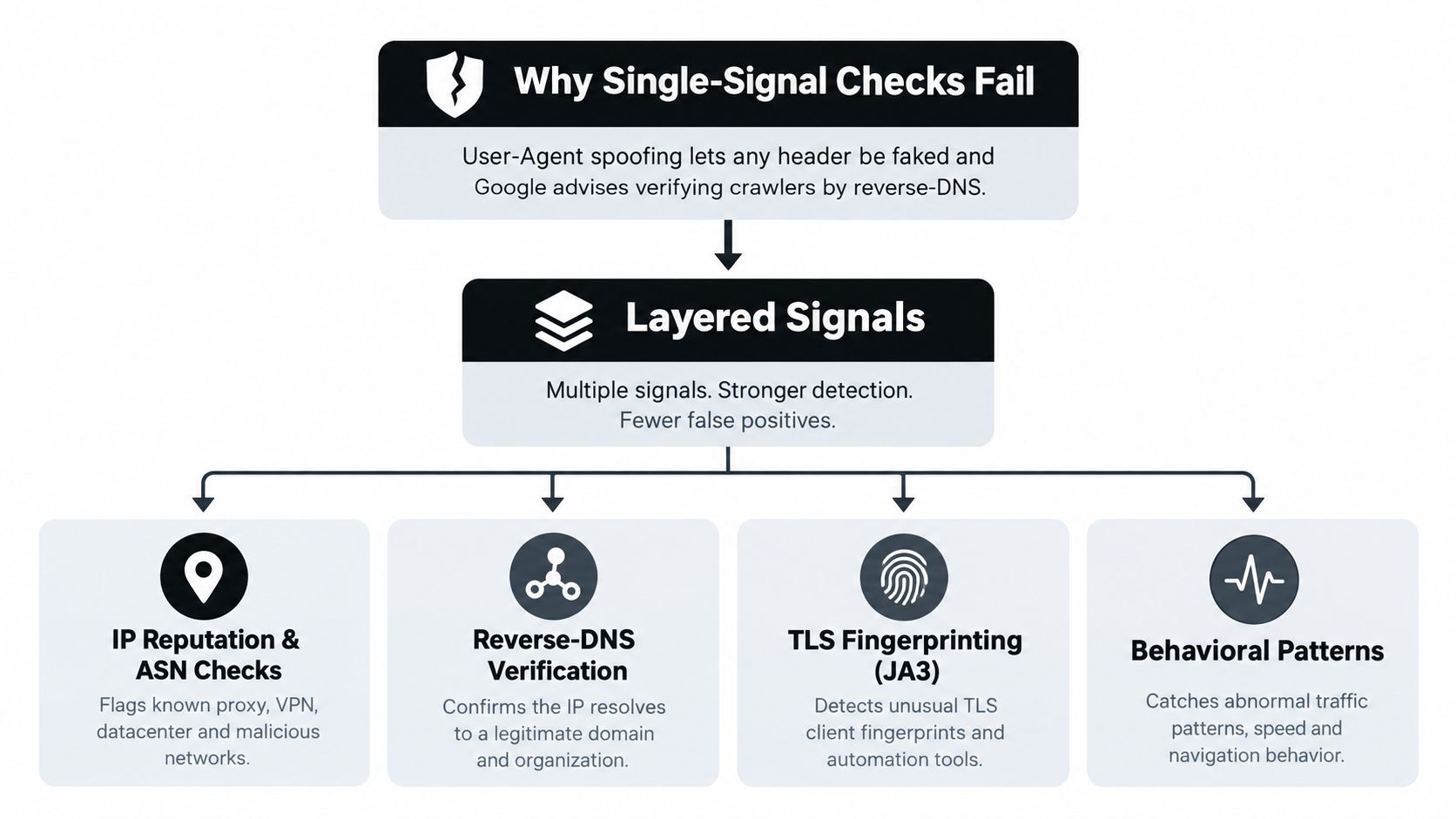
The first mistake is treating one field as proof. A User-Agent string can claim to represent a search crawler even when another crawler has copied it. Google explicitly warns that the User-Agent header alone can't verify Googlebot. Its recommended process uses reverse-DNS verification, an allowed Googlebot hostname, and a forward-DNS check back to the original address. Google's crawler verification guidance gives the operational rule.
IP reputation has a similar weakness. Residential proxies route requests through genuine household addresses, so a malicious session may look geographically normal and avoid a data-center blocklist. Research presented at NDSS found that conventional round-trip-time proxy detection could see recall fall from 99% to 8% under simple traffic-scheduling attacks. A two-tier method using traffic-flow and architectural-correlation features achieved over 98% precision and recall for proxyware devices and over 92% F1 against advanced attacks under the study's conditions. The NDSS research shows why latency alone isn't a durable control.
Build a signal stack
A practical Shopify risk score combines several clues:
- Connection intelligence: Check proxy and VPN indicators, ASN type, and whether the network resembles a data center, residential provider, or mobile carrier.
- Technical consistency: Compare TLS and HTTP fingerprint behavior with the claimed device and browser pattern.
- Session continuity: Look for cookie persistence, device continuity, repeated account use, and abrupt identity changes.
- Navigation cadence: Measure request speed, repeated product traversal, unusual session depth, and the timing between actions.
- Checkout behavior: Review payment attempts, checkout progression, address consistency, and whether the session behaves like a person completing a purchase.
- Historical context: Add account age, order history, prior outcomes, and geovelocity to the decision.
These signals should produce a risk score, not a yes-or-no block. A traveler on a VPN who browses at a normal pace and uses a consistent device may need no intervention. A session that rotates masked addresses while requesting the same products and testing checkout should receive stronger controls.
The useful output is four traffic classes: human, good bot, suspicious session, and bad bot. Each class can then be routed differently. Verified crawlers can continue indexing, suspicious catalog browsing can face a challenge or rate limit, and corroborated abuse can be blocked before it contaminates downstream reporting.
That upstream decision affects more than Shopify Analytics. It also determines whether automated activity enters email flows, support queues, and review systems. The merchant should therefore treat filtering as a data-quality control across connected operations, not only as a storefront firewall.
What Shopify Gives You and Where the Gaps Remain
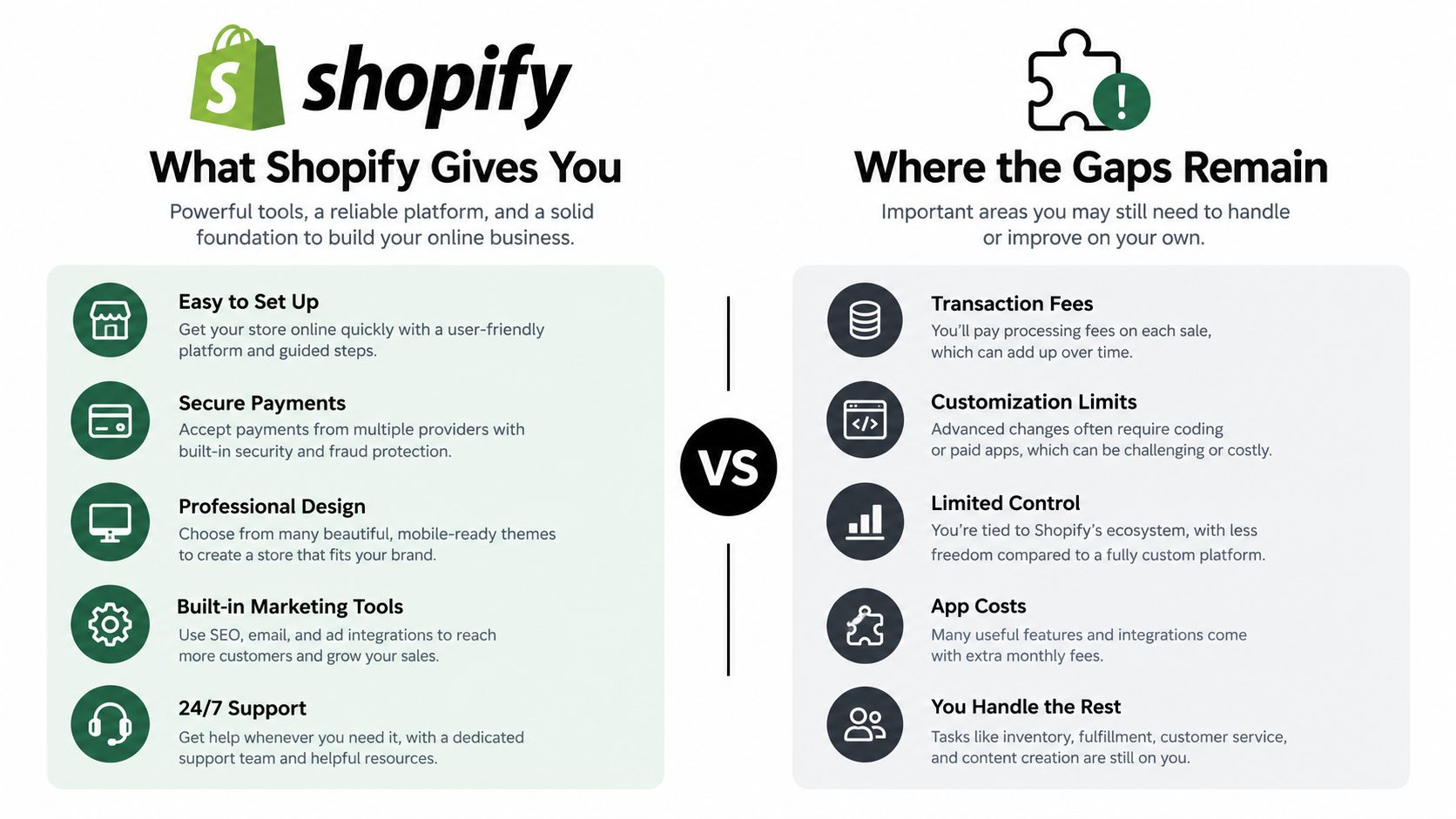
A useful way to read Shopify's native protections is by asking one practical question: at what point does each control act? Some controls protect the storefront edge. Others help during order review. Very few decide whether a session should count as trustworthy traffic before it reaches reports, support queues, or marketing tools.
The platform gives merchants a real starting point. The Cloudflare layer described earlier filters a share of abusive storefront activity and can challenge traffic that looks automated or masked. Shopify also surfaces order-risk signals, and stores using Shopify Payments may see proxy use as one reason to review an order rather than approve it blindly. During high-demand sales, extra checkout bot protection is limited to eligible Shopify Plus setups.
Match the job to the control
| Job | Native Shopify tool | What it covers | Where the gap is |
|---|---|---|---|
| Storefront request protection | Cloudflare WAF and DDoS protection | Filters and challenges much automated storefront activity | Merchants still need to interpret traffic quality in analytics |
| Visitor verification | Cloudflare challenge | Gives a visitor a chance to verify a connection that looks automated or uses a VPN | A challenge is only a checkpoint. It can interrupt legitimate shoppers and still does not classify session quality |
| Order-risk review | Shopify Fraud Analysis | Presents order-risk information for review | It acts at the order stage, after browsing and event data may already have entered reports |
| Masked network signal | Shopify Payments proxy detection | Flags proxy or proxy-IP orders for review | It does not prove fraud and does not classify every storefront session |
| Checkout bot protection during sales | Shopify Plus capability | Adds extra protection for eligible Plus stores | Availability is limited to Shopify Plus during sales |
| Downstream data quality | Merchant process and connected-tool controls | Lets teams decide what events should be trusted | Analytics, email, support, and review datasets can still receive unfiltered activity |
That timing gap matters more than many teams expect.
If a bot scrapes hundreds of product pages, triggers analytics events, starts carts, or reaches checkout before anything is stopped, the operational cost has already started. Dashboards get noisier. Fraud review gets slower. Chargeback exposure can rise because the team is sorting mixed traffic instead of clean human intent. The problem is not only abuse at the edge. It is traffic quality flowing into decisions.
This is also a governance issue. Teams working on keeping analytics data secure should decide not only who can access reports, but which events are allowed to enter those reports at all.
So the gap is not that Shopify lacks protection. The gap is classification. Merchants still need a way to separate human, masked, and automated sessions early enough to protect reporting, pricing, and operations. For a broader explanation of that platform role, see Shopify bot protection.
A Practical Mitigation Playbook for Merchants
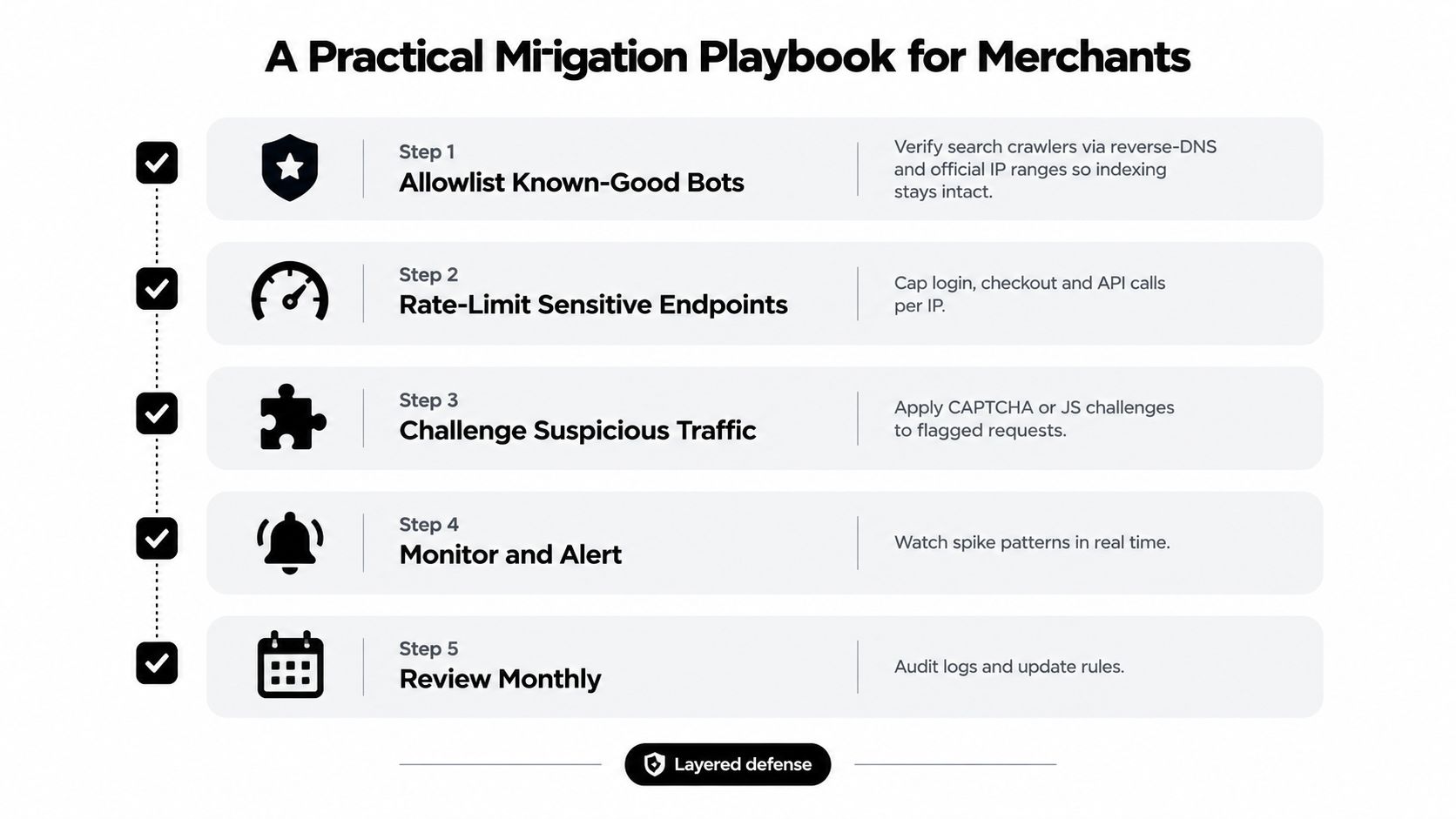
Mitigation works when it treats traffic quality like queue management, not a yes or no fraud switch. A storefront needs room for approved automation such as search indexing and monitoring, while bad automation needs to lose speed, lose access, or get stopped before it pollutes reporting and downstream workflows. The goal is separation first. Human, masked, and automated sessions should not all flow into the same bucket and then force the team to sort out the mess later.
Start with known-good automation
Begin with the traffic you want. Verify major crawlers instead of trusting a claimed User-Agent string. Reverse DNS checks and published crawler ranges help confirm that a session is what it says it is. Approved monitoring should also be easy to identify and tied to a real business purpose.
Then classify traffic upstream. If low-quality sessions trigger pageviews, cart events, support flows, review requests, or email automations, cleanup work spreads across multiple teams. It is easier to filter one stream at the storefront edge than to repair four damaged datasets after the fact.
Apply progressive friction
Use friction in layers, like a warehouse that checks badges at different doors instead of locking the whole building.
- Rate-limit suspicious catalog activity. Repeated page fetches, unusual pathing, or request bursts can be slowed without blocking a real shopper on the first signal.
- Challenge uncertain sessions. Browser verification or JavaScript challenges help test whether the session behaves like a normal client before you reject it.
- Increase checkout scrutiny. Sessions with multiple risk signals should face stronger verification before payment authorization or fulfillment review.
- Block corroborated abuse. Hard blocks fit patterns supported by several indicators, not a single proxy or VPN flag.
A behavior-based setup matters because a meaningful share of recorded requests may not be human, as noted earlier. A block-everything rule would also catch useful automation and create avoidable blind spots.
Measure whether the controls helped
Check impact with two views of the same store. Compare total sessions against a quality-filtered cohort, then segment by country, ASN, device, and landing page. If the filtering is working, conversion metrics become easier to trust and fraud review volume should become easier to handle.
A useful operating dashboard separates three buckets:
- Blocked risk, activity stopped before it reached sensitive paths.
- Suspected automation, activity that still needs monitoring or review.
- Verified human conversion, performance from a cleaner visitor cohort.
Keep proxy and VPN signals in the score, but do not let them decide the case alone. Travel, shared networks, privacy tools, and corporate gateways can all mask a legitimate shopper. Better decisions come from combining network signals with device continuity, navigation cadence, checkout progression, and account history.
A practical checklist stays short:
- Challenge rules: confirm when and why visitors see them.
- Order risk review: apply the same review standard each time.
- Proxy detection: use it as review input, not automatic proof.
- Upstream traffic quality: classify storefront and API activity before connected systems consume it.
For teams dealing with both masked access and automation, this guide to Shopify bot traffic and VPN abuse offers a focused operating reference.
Where Securify Fits
Securify acts as an upstream traffic-quality layer for Shopify stores. It can block bots across storefront sessions, detect VPN and proxy traffic, apply geo-blocking rules, and protect catalog and pricing pages from scraping. Its traffic classification separates bad bots, suspicious sessions, and real visitors so merchants can evaluate cleaner reporting.
The service also offers a no-signup Store X-Ray scan that evaluates recent traffic quality in about 30 seconds. It has native integrations with Shopify, Klaviyo, Gorgias, and Judge.me, helping keep low-quality activity out of email lists, support queues, and product reviews. The Shopify App Store listing is called Country Blocker Fraud Securify, and a free plan is available. See Securify on the Shopify App Store for the current listing and plan details.
Frequently Asked Questions About Bots and Proxies on Shopify
Do all proxy users need to be blocked?
No. A proxy is a signal, not a verdict. Shopify's proxy-detection flag is intended for review, so combine it with order, device, account, and behavior signals before declining a purchase.
How can merchants tell if bots are distorting analytics?
Compare total sessions with a quality-filtered cohort, segmented by country, ASN, device, and landing page. If conversion changes materially after filtering, automated concentration may have been masking the performance of genuine shoppers.
What is the difference between a bot and a proxy?
A bot is software that performs actions automatically. A proxy is a network path that hides or changes the apparent origin of those actions, and abusive bots often use proxies together.
Do bots affect Shopify Analytics, email lists, and support tickets in the same way?
They can, when unfiltered events flow into each system. Automated activity may inflate Shopify reports, trigger email flows, create support work, or generate review activity, which is why traffic quality should be handled before downstream systems receive the event.
If bots and proxies are distorting your Shopify data or filling your fraud queue, Securify can classify and control suspicious storefront traffic before it spreads into analytics and connected tools. Visit Securify to assess your traffic quality and choose the controls that fit your store.